<?xml version="1.0" encoding="utf-8"?><feed xmlns="http://www.w3.org/2005/Atom" ><generator uri="https://jekyllrb.com/" version="3.10.0">Jekyll</generator><link href="https://janaagaard.com/blog/atom.xml" rel="self" type="application/atom+xml" /><link href="https://janaagaard.com/" rel="alternate" type="text/html" /><updated>2026-03-01T21:01:37+00:00</updated><id>https://janaagaard.com/blog/atom.xml</id><title type="html">Jan Aagaard’s Blog</title><subtitle>Jan Aagaard&apos;s blog about software development.</subtitle><author><name>{&quot;twitter&quot;=&gt;&quot;janaagaard&quot;}</name></author><entry><title type="html">All blog posts on expo.dev</title><link href="https://janaagaard.com/blog/2025-08-01-expo-blog-posts" rel="alternate" type="text/html" title="All blog posts on expo.dev" /><published>2025-08-01T00:00:00+00:00</published><updated>2025-08-01T00:00:00+00:00</updated><id>https://janaagaard.com/blog/expo-blog-posts</id><content type="html" xml:base="https://janaagaard.com/blog/2025-08-01-expo-blog-posts"><![CDATA[<p>The <a href="https://expo.dev/blog">blog posts on expo.dev</a> are a real gold mine for tips and tricks on Expo and React Native development. But I got annoyed at having to click on the Load More button every time I navigate back to the page, so I extracted the full list of posts from the sitemap file. I still haven’t figured out how to automate updating this list, so for now it’s always a bit out of date.</p>

<p>2026-02-27 - <a href="https://expo.dev/blog/ship-smaller-ota-updates-bundle-diffing-comes-to-ota-updates-in-sdk-55">Ship smaller OTA updates: bundle diffing comes to EAS Update in SDK 55</a></p>

<p>2026-02-26 - <a href="https://expo.dev/blog/upgrading-to-sdk-55">How to upgrade to SDK 55</a></p>

<p>2026-02-24 - <a href="https://expo.dev/blog/5-ota-update-best-practices-every-mobile-team-should-know">5 OTA Update best practices every mobile team should know</a></p>

<p>2026-02-20 - <a href="https://expo.dev/blog/automating-ota-updates-how-onespot-deploys-to-200-apps-without-touching-a-laptop">Automating OTA Updates: How Onespot deploys to 200+ apps without touching</a></p>

<p>2026-02-18 - <a href="https://expo.dev/blog/the-production-playbook-for-ota-updates">The production playbook for OTA updates</a></p>

<p>2026-02-12 - <a href="https://expo.dev/blog/automate-mobile-ci-cd-with-eas-workflows-and-custom-builds">Automate mobile CI/CD with EAS Workflows and custom builds</a></p>

<p>2026-02-11 - <a href="https://expo.dev/blog/building-an-ai-first-photos-app-with-expo-and-coreviz-sdk">Building an AI-first Photos app with Expo and Coreviz SDK</a></p>

<p>2026-02-06 - <a href="https://expo.dev/blog/what-our-web-team-learned-using-claude-code-for-a-month">What our web team learned using Claude Code for a month</a></p>

<p>2026-02-06 - <a href="https://expo.dev/blog/how-to-modernize-mobile-retail-apps-with-expo">How to modernize mobile retail apps with Expo</a></p>

<p>2026-02-03 - <a href="https://expo.dev/blog/building-high-quality-uis-with-expo-and-nativewind">Building high-quality UIs with Expo and NativeWind</a></p>

<p>2026-01-30 - <a href="https://expo.dev/blog/how-to-increase-mobile-app-downloads-and-retention">5 tips to increase mobile app downloads and retention in 2026</a></p>

<p>2026-01-29 - <a href="https://expo.dev/blog/how-sanas-built-an-instant-language-translation-app-with-expo">How Sanas built a real-time video translation app in 3 months using Expo</a></p>

<p>2026-01-28 - <a href="https://expo.dev/blog/building-a-cross-platform-app-without-touching-xcode-or-android-studio">The solo dev playbook: ship faster with Expo, EAS Build, and OTA Updates</a></p>

<p>2026-01-21 - <a href="https://expo.dev/blog/channel-surfing-for-expo-updates-how-to-switch-update-channels-at-runtime">Channel surfing for Expo Updates: How to switch update channels at runtime</a></p>

<p>2026-01-20 - <a href="https://expo.dev/blog/strapi-cms-for-react-native">Strapi: low-code CMS for Expo and React Native</a></p>

<p>2026-01-15 - <a href="https://expo.dev/blog/making-ai-feel-human-in-a-mobile-app-with-expo-reanimated-and-skia">Making AI feel human in a mobile app with Expo, Reanimated, and Skia</a></p>

<p>2026-01-13 - <a href="https://expo.dev/blog/how-the-minecraft-speedrunning-community-stays-fast-with-expo">How the Minecraft Speedrunning Community stays fast with Expo</a></p>

<p>2026-01-08 - <a href="https://expo.dev/blog/cutout-camera-effects-in-react-native-with-expo-camera-and-maskedview">Cutout camera effects in React Native with Expo Camera and MaskedView</a></p>

<p>2026-01-06 - <a href="https://expo.dev/blog/the-offline-first-multilingual-audio-tour-app-built-with-expo">The offline first, multilingual audio tour app built with Expo</a></p>

<p>2025-12-18 - <a href="https://expo.dev/blog/how-to-build-a-dev-server-in-the-browser">How I built a dev server entirely in the browser</a></p>

<p>2025-12-17 - <a href="https://expo.dev/blog/ai-powered-code-reviews-for-your-expo-projects">AI-powered code reviews for your Expo projects</a></p>

<p>2025-12-16 - <a href="https://expo.dev/blog/feature-previews-from-pull-requests">How to turn every pull request into an instantly installable preview</a></p>

<p>2025-12-15 - <a href="https://expo.dev/blog/expo-now-supports-maestro-cloud-testing-in-your-ci-workflow">Expo now supports Maestro Cloud testing in your CI workflow</a></p>

<p>2025-12-11 - <a href="https://expo.dev/blog/from-web-to-native-with-react">From web to native with React</a></p>

<p>2025-12-10 - <a href="https://expo.dev/blog/how-to-implement-ios-widgets-in-expo-apps">How to implement iOS widgets in Expo apps</a></p>

<p>2025-12-09 - <a href="https://expo.dev/blog/how-expo-streamlined-hipcamps-native-and-over-the-air-update-processes">How Expo streamlined Hipcamp’s native and over-the-air update processes</a></p>

<p>2025-12-04 - <a href="https://expo.dev/blog/how-mta-uses-expo-to-keep-new-york-city-moving">How MTA uses Expo to keep New York City moving</a></p>

<p>2025-12-02 - <a href="https://expo.dev/blog/scaling-sign-language-education-to-4-million-learners-with-expo">How Lingvano scales sign language education to 4 million learners with</a></p>

<p>2025-11-25 - <a href="https://expo.dev/blog/how-to-create-apple-maps-style-liquid-glass-sheets">How to create Apple Maps style liquid glass sheets in Expo (the real way)</a></p>

<p>2025-11-20 - <a href="https://expo.dev/blog/optimize-user-experience-and-drive-engagement-with-vexo-and-expo">Optimize user experience and drive engagement with Vexo &amp; Expo</a></p>

<p>2025-11-19 - <a href="https://expo.dev/blog/from-a-brownfield-react-native-and-next-js-stack-to-one-expo-app">Going Universal: From a brownfield React Native and Next.js stack to one</a></p>

<p>2025-11-13 - <a href="https://expo.dev/blog/how-to-integrate-eas-workflows-with-github-actions">How to integrate EAS Workflows with GitHub Actions for faster mobile CI</a></p>

<p>2025-11-11 - <a href="https://expo.dev/blog/how-phantom-ships-a-secure-high-performance-crypto-wallet-with-expo">How Phantom ships a secure, high-performance crypto wallet with Expo</a></p>

<p>2025-11-04 - <a href="https://expo.dev/blog/eas-hosting-is-a-faster-simpler-way-to-deploy-your-app-and-api-together">EAS Hosting is a faster, simpler way to deploy your app and API together</a></p>

<p>2025-10-30 - <a href="https://expo.dev/blog/building-a-midi-over-bluetooth-app-using-expo-modules">Building a MIDI-over-Bluetooth app using Expo Modules</a></p>

<p>2025-10-28 - <a href="https://expo.dev/blog/faster-more-reliable-video-uploads-with-expo-modules">Faster, more reliable video uploads with Expo Modules</a></p>

<p>2025-10-23 - <a href="https://expo.dev/blog/the-business-value-of-expo">Expo is more than a dev framework, it’s a business strategy</a></p>

<p>2025-10-21 - <a href="https://expo.dev/blog/become-an-ai-native-developer-with-the-expo-mcp-server">Become an AI-native developer with the Expo MCP server</a></p>

<p>2025-10-20 - <a href="https://expo.dev/blog/the-react-foundation">The React Foundation: A new chapter for React and React Native</a></p>

<p>2025-10-16 - <a href="https://expo.dev/blog/how-to-add-native-code-to-your-app-with-expo-modules">How to add native code to your app with Expo Modules</a></p>

<p>2025-10-14 - <a href="https://expo.dev/blog/how-to-bring-expo-into-mature-native-apps">No rewrite required: How to bring Expo into mature native apps</a></p>

<p>2025-10-06 - <a href="https://expo.dev/blog/2025-expo-app-awards">The 2025 Expo App Awards: A celebration of the best Expo apps</a></p>

<p>2025-10-02 - <a href="https://expo.dev/blog/how-to-run-ai-models-with-react-native-executorch">The future of AI apps is on the device: How to run AI models with React</a></p>

<p>2025-09-30 - <a href="https://expo.dev/blog/swift-to-react-native">From Swift tattoo to React Native migration lead: a business-first</a></p>

<p>2025-09-25 - <a href="https://expo.dev/blog/storybook-and-expo">Building beautiful components faster with Storybook 9 and Expo</a></p>

<p>2025-09-23 - <a href="https://expo.dev/blog/expo-app-folder-structure-best-practices">How to organize Expo app folder structure for clarity and scalability</a></p>

<p>2025-09-16 - <a href="https://expo.dev/blog/expo-file-system">Expo File System gets a major upgrade in SDK 54</a></p>

<p>2025-09-15 - <a href="https://expo.dev/blog/expo-app-integrity">Expo App Integrity</a></p>

<p>2025-09-12 - <a href="https://expo.dev/blog/liquid-glass-app-with-expo-ui-and-swiftui">Liquid glass app with Expo UI and SwiftUI</a></p>

<p>2025-09-11 - <a href="https://expo.dev/blog/expo-router-v6">Expo Router v6</a></p>

<p>2025-09-10 - <a href="https://expo.dev/blog/expo-sdk-upgrade-guide">Expo SDK upgrade guide</a></p>

<p>2025-08-28 - <a href="https://expo.dev/blog/what-synced-in-app-sqlite-brings-to-expo-apps">What synced in-app SQLite brings to Expo apps</a></p>

<p>2025-08-20 - <a href="https://expo.dev/blog/introducing-expo-launch">Introducing Expo Launch</a></p>

<p>2025-08-13 - <a href="https://expo.dev/blog/how-mollie-uses-expo-to-power-its-multi-platform-payments-app">How Mollie uses Expo to power its multi-platform payments app</a></p>

<p>2025-08-07 - <a href="https://expo.dev/blog/eas-update-best-practices">EAS Update best practices</a></p>

<p>2025-08-05 - <a href="https://expo.dev/blog/building-dyfna-with-expo">Building Dyfna with Expo</a></p>

<p>2025-07-31 - <a href="https://expo.dev/blog/5-expo-sdk-features">5 Expo SDK features</a></p>

<p>2025-07-29 - <a href="https://expo.dev/blog/6-reasons-to-use-eas-update">6 reasons to use EAS Update</a></p>

<p>2025-07-24 - <a href="https://expo.dev/blog/precompiled-react-native-for-ios">Precompiled React Native for iOS</a></p>

<p>2025-07-22 - <a href="https://expo.dev/blog/build-2d-game-style-physics-with-matter-js-and-react-native-skia">Build 2D game-style physics with Matter.js and React Native Skia</a></p>

<p>2025-07-17 - <a href="https://expo.dev/blog/camera-powered-sommelier-with-expo">Camera-powered sommelier with Expo</a></p>

<p>2025-07-31 - <a href="https://expo.dev/blog/5-expo-sdk-features">5 Expo SDK features</a></p>

<p>2025-07-29 - <a href="https://expo.dev/blog/6-reasons-to-use-eas-update">6 reasons to use EAS Update</a></p>

<p>2025-07-24 - <a href="https://expo.dev/blog/precompiled-react-native-for-ios">Precompiled React Native for iOS</a></p>

<p>2025-07-22 - <a href="https://expo.dev/blog/build-2d-game-style-physics-with-matter-js-and-react-native-skia">Build 2D game-style physics with Matter.js and React Native Skia</a></p>

<p>2025-07-17 - <a href="https://expo.dev/blog/camera-powered-sommelier-with-expo">Camera-powered sommelier with Expo</a></p>

<p>2025-07-15 - <a href="https://expo.dev/blog/accelerating-continuous-integration-with-fingerprint-repack-in-eas-workflows">Accelerating continuous integration with fingerprint repack in EAS Workflows</a></p>

<p>2025-07-10 - <a href="https://expo.dev/blog/how-to-build-seamless-subscriptions-with-expo-and-revenuecat">How to build seamless subscriptions with Expo and RevenueCat</a></p>

<p>2025-07-08 - <a href="https://expo.dev/blog/unistyles-3-0-beyond-react-native-stylesheet">Unistyles 3.0: beyond React Native StyleSheet</a></p>

<p>2025-07-03 - <a href="https://expo.dev/blog/how-to-build-apps-fast">How to build apps fast</a></p>

<p>2025-07-01 - <a href="https://expo.dev/blog/real-app-store-apps-using-ai-and-expo">Real App Store apps using AI and Expo</a></p>

<p>2025-06-24 - <a href="https://expo.dev/blog/expo-revenuecat-in-app-purchase-tutorial">Expo RevenueCat in-app purchase tutorial</a></p>

<p>2025-06-19 - <a href="https://expo.dev/blog/app-architecture-with-expo-router-elysiajs-and-nativewind">App architecture with Expo Router, ElysiaJS, and NativeWind</a></p>

<p>2025-06-17 - <a href="https://expo.dev/blog/simplifying-auth-flows-with-protected-routes">Simplifying auth flows with protected routes</a></p>

<p>2025-06-12 - <a href="https://expo.dev/blog/what-if-usestate-was-your-backend">What if useState was your backend</a></p>

<p>2025-06-10 - <a href="https://expo.dev/blog/mobile-game-development-with-expo">Mobile game development with Expo</a></p>

<p>2025-06-03 - <a href="https://expo.dev/blog/which-android-apps-are-built-with-expo">Which Android apps are built with Expo</a></p>

<p>2025-05-26 - <a href="https://expo.dev/blog/how-to-get-your-ai-app-to-the-app-store">How to get your AI app to the App Store</a></p>

<p>2025-05-23 - <a href="https://expo.dev/blog/what-are-environment-variables">What are environment variables</a></p>

<p>2025-05-21 - <a href="https://expo.dev/blog/diagnose-and-debug-errors-faster-with-issues-and-replays-from-sentry-in-expo">Diagnose and debug errors faster with issues and replays from Sentry in Expo</a></p>

<p>2025-05-15 - <a href="https://expo.dev/blog/expo-iot-device-provisioning-with-https-via-wifi">Expo IoT device provisioning with HTTPS via WiFi</a></p>

<p>2025-05-14 - <a href="https://expo.dev/blog/real-time-audio-processing-with-expo-and-native-code">Real-time audio processing with Expo and native code</a></p>

<p>2025-05-08 - <a href="https://expo.dev/blog/build-cache-providers-in-expo">Build cache providers in Expo</a></p>

<p>2025-05-05 - <a href="https://expo.dev/blog/expo-router-v5">Expo Router v5</a></p>

<p>2025-05-01 - <a href="https://expo.dev/blog/introducing-expo-maps-a-modern-maps-api-for-expo-developers">Introducing Expo Maps: a modern maps API for Expo developers</a></p>

<p>2025-05-01 - <a href="https://expo.dev/blog/goodbye-background-fetch-hello-expo-background-task">Goodbye Background Fetch, hello Expo Background Task</a></p>

<p>2025-05-01 - <a href="https://expo.dev/blog/mobile-app-payment-processing-best-practices">Mobile app payment processing best practices</a></p>

<p>2025-04-29 - <a href="https://expo.dev/blog/migrating-to-react-native-with-expo">Migrating to React Native with Expo</a></p>

<p>2025-04-24 - <a href="https://expo.dev/blog/apple-sdk-minimum-requirements">Apple SDK minimum requirements</a></p>

<p>2025-04-22 - <a href="https://expo.dev/blog/best-practices-for-reducing-lag-in-expo-apps">Best practices for reducing lag in Expo apps</a></p>

<p>2025-04-21 - <a href="https://expo.dev/blog/out-with-the-old-in-with-the-new-architecture">Out with the old, in with the New Architecture</a></p>

<p>2025-04-17 - <a href="https://expo.dev/blog/how-to-build-universal-app-voice-agents-with-expo-and-elevenlabs">How to build universal app voice agents with Expo and ElevenLabs</a></p>

<p>2025-04-15 - <a href="https://expo.dev/blog/deploying-an-expo-app-to-web-with-eas-hosting">Deploying an Expo app to web with EAS Hosting</a></p>

<p>2025-04-09 - <a href="https://expo.dev/blog/replit-expo-and-grok">Replit, Expo, and Grok</a></p>

<p>2025-04-04 - <a href="https://expo.dev/blog/use-expo-ship-faster">Use Expo, ship faster</a></p>

<p>2025-04-03 - <a href="https://expo.dev/blog/build-offline-first-mobile-apps">Build offline-first mobile apps</a></p>

<p>2025-04-02 - <a href="https://expo.dev/blog/understanding-and-comparing-fingerprints-in-expo-apps">Understanding and comparing fingerprints in Expo apps</a></p>

<p>2025-03-28 - <a href="https://expo.dev/blog/how-we-built-a-tiktok-for-bluesky-with-expo">How we built a TikTok for Bluesky with Expo</a></p>

<p>2025-03-26 - <a href="https://expo.dev/blog/ship-fast-learn-faster-introducing-vexo-funnels-for-expo-apps">Ship fast, learn faster: introducing Vexo Funnels for Expo apps</a></p>

<p>2025-03-19 - <a href="https://expo.dev/blog/build-and-launch-ai-apps-with-create-and-expo">Build and launch AI apps with Create and Expo</a></p>

<p>2025-03-17 - <a href="https://expo.dev/blog/how-tempo-and-expo-redefine-mobile-app-development">How Tempo and Expo redefine mobile app development</a></p>

<p>2025-03-11 - <a href="https://expo.dev/blog/idea-to-app-in-40-hours">Idea to app in 40 hours</a></p>

<p>2025-03-06 - <a href="https://expo.dev/blog/how-to-build-a-solid-test-harness-for-expo-apps">How to build a solid test harness for Expo apps</a></p>

<p>2025-02-27 - <a href="https://expo.dev/blog/4-must-have-radon-ide-features-for-even-more-convenient-expo-development">4 must-have Radon IDE features for even more convenient Expo development</a></p>

<p>2025-02-20 - <a href="https://expo.dev/blog/from-idea-to-app-with-replit-and-expo">From idea to app with Replit and Expo</a></p>

<p>2025-02-19 - <a href="https://expo.dev/blog/how-to-build-custom-tabs-with-expo-router-ui">How to build custom tabs with Expo Router UI</a></p>

<p>2025-02-14 - <a href="https://expo.dev/blog/learn-from-user-behavior-with-logrocket-and-expo">Learn from user behavior with LogRocket and Expo</a></p>

<p>2025-02-12 - <a href="https://expo.dev/blog/bolt-expo-integration-announcement">Bolt Expo integration announcement</a></p>

<p>2025-02-06 - <a href="https://expo.dev/blog/increase-your-expo-power-with-ignite-generators">Increase your Expo power with Ignite generators</a></p>

<p>2025-02-04 - <a href="https://expo.dev/blog/universal-and-app-links">Universal and app links</a></p>

<p>2025-01-30 - <a href="https://expo.dev/blog/dom-component-use-case">DOM component use case</a></p>

<p>2025-01-28 - <a href="https://expo.dev/blog/how-to-build-beautiful-react-native-bottom-tabs">How to build beautiful React Native bottom tabs</a></p>

<p>2025-01-26 - <a href="https://expo.dev/blog/one-codebase-three-brands-how-awaze-shipped-3-enterprise-apps-fast-with-expo">One codebase, three brands: how Awaze shipped 3 enterprise apps fast with Expo</a></p>

<p>2025-01-21 - <a href="https://expo.dev/blog/how-i-migrated-my-bare-react-native-app-to-expo">How I migrated my bare React Native app to Expo</a></p>

<p>2025-01-17 - <a href="https://expo.dev/blog/eas-soc2-type2">EAS SOC2 Type2</a></p>

<p>2025-01-14 - <a href="https://expo.dev/blog/expo-announces-eas-hosting-service">Expo announces EAS Hosting service</a></p>

<p>2025-01-07 - <a href="https://expo.dev/blog/modern-sqlite-for-react-native-apps">Modern SQLite for React Native apps</a></p>

<p>2024-12-19 - <a href="https://expo.dev/blog/why-expo-is-a-great-fit-for-new-and-existing-react-native-apps">Why Expo is a great fit for new and existing React Native apps</a></p>

<p>2024-12-18 - <a href="https://expo.dev/blog/2024-year-in-review">2024 year in review</a></p>

<p>2024-12-17 - <a href="https://expo.dev/blog/how-we-promote-social-sharing-on-marathon-with-expo">How we promote social sharing on Marathon with Expo</a></p>

<p>2024-12-12 - <a href="https://expo.dev/blog/upcoming-apple-push-notification-service-certificate-change">Upcoming Apple Push Notification Service certificate change</a></p>

<p>2024-12-10 - <a href="https://expo.dev/blog/the-real-world-impact-of-shared-objects">The real world impact of shared objects</a></p>

<p>2024-12-03 - <a href="https://expo.dev/blog/expo-video-a-simple-powerful-way-to-play-videos-in-apps">Expo Video: a simple, powerful way to play videos in apps</a></p>

<p>2024-11-27 - <a href="https://expo.dev/blog/upgrading-to-expo-sdk-52">Upgrading to Expo SDK 52</a></p>

<p>2024-11-26 - <a href="https://expo.dev/blog/edge-to-edge-display-now-streamlined-for-android">Edge-to-edge display now streamlined for Android</a></p>

<p>2024-11-22 - <a href="https://expo.dev/blog/environment-variables">Environment variables</a></p>

<p>2024-11-21 - <a href="https://expo.dev/blog/local-first-application-development-with-livestore">Local-first application development with LiveStore</a></p>

<p>2024-11-20 - <a href="https://expo.dev/blog/expo-workflows-automate-your-release-process">Expo Workflows: automate your release process</a></p>

<p>2024-11-19 - <a href="https://expo.dev/blog/the-magic-of-expo-dom-components">The magic of Expo DOM components</a></p>

<p>2024-11-14 - <a href="https://expo.dev/blog/universal-react-server-components-developer-preview">Universal React Server Components developer preview</a></p>

<p>2024-11-12 - <a href="https://expo.dev/blog/how-to-add-an-animated-splash-screen-with-expo-custom-assets">How to add an animated splash screen with Expo custom assets</a></p>

<p>2024-11-07 - <a href="https://expo.dev/blog/what-is-the-best-react-native-list-component">What is the best React Native list component</a></p>

<p>2024-11-05 - <a href="https://expo.dev/blog/the-architecture-of-a-conference-application-built-with-expo">The architecture of a conference application built with Expo</a></p>

<p>2024-10-29 - <a href="https://expo.dev/blog/build-mobile-apps-faster-with-expo-and-thirdweb">Build mobile apps faster with Expo and thirdweb</a></p>

<p>2024-10-22 - <a href="https://expo.dev/blog/how-to-bring-your-react-native-apps-to-life-using-sensors">How to bring your React Native apps to life using sensors</a></p>

<p>2024-10-15 - <a href="https://expo.dev/blog/build-a-daily-workout-tracker-with-clerk-convex-and-expo">Build a daily workout tracker with Clerk, Convex, and Expo</a></p>

<p>2024-10-08 - <a href="https://expo.dev/blog/payhip-boosts-seller-experience-with-expo-powered-mobile-app">Payhip boosts seller experience with Expo-powered mobile app</a></p>

<p>2024-10-01 - <a href="https://expo.dev/blog/how-to-synchronize-reactive-local-first-apps-with-tinybase">How to synchronize reactive local-first apps with TinyBase</a></p>

<p>2024-09-23 - <a href="https://expo.dev/blog/how-to-incrementally-adopt-expo">How to incrementally adopt Expo</a></p>

<p>2024-09-17 - <a href="https://expo.dev/blog/why-i-gave-expo-a-second-chance">Why I gave Expo a second chance</a></p>

<p>2024-09-12 - <a href="https://expo.dev/blog/expo-go-vs-development-builds">Expo Go vs development builds</a></p>

<p>2024-09-10 - <a href="https://expo.dev/blog/the-beauty-of-mathematics-in-crafting-stunning-animations">The beauty of mathematics in crafting stunning animations</a></p>

<p>2024-09-05 - <a href="https://expo.dev/blog/from-idea-to-google-play-store-in-100-days">From idea to Google Play Store in 100 days</a></p>

<p>2024-08-29 - <a href="https://expo.dev/blog/create-and-run-fast-end-to-end-tests-using-moropo-and-expo">Create and run fast end-to-end tests using Moropo and Expo</a></p>

<p>2024-08-26 - <a href="https://expo.dev/blog/how-rosebud-decided-to-go-native-with-expo">How Rosebud decided to go native with Expo</a></p>

<p>2024-08-22 - <a href="https://expo.dev/blog/what-to-do-without-codepush">What to do without CodePush</a></p>

<p>2024-08-19 - <a href="https://expo.dev/blog/how-to-build-a-bluetooth-low-energy-powered-expo-app">How to build a Bluetooth Low Energy powered Expo app</a></p>

<p>2024-08-15 - <a href="https://expo.dev/blog/how-expo-helps-my-startup-grow-faster">How Expo helps my startup grow faster</a></p>

<p>2024-07-30 - <a href="https://expo.dev/blog/what-is-continuous-native-generation">What is Continuous Native Generation</a></p>

<p>2024-07-23 - <a href="https://expo.dev/blog/from-rnc-cli-to-expo">From RNC CLI to Expo</a></p>

<p>2024-07-18 - <a href="https://expo.dev/blog/build-fast-flexible-calendars-in-react-native-with-flash-calendar">Build fast, flexible calendars in React Native with Flash Calendar</a></p>

<p>2024-07-16 - <a href="https://expo.dev/blog/increase-iteration-speed-with-pr-previews">Increase iteration speed with PR previews</a></p>

<p>2024-07-11 - <a href="https://expo.dev/blog/from-web-to-native-with-react">From Web to Native with React</a></p>

<p>2024-07-09 - <a href="https://expo.dev/blog/rebuilding-a-10-year-old-ios-app-with-expo">Rebuilding a 10-year-old iOS app with Expo</a></p>

<p>2024-06-20 - <a href="https://expo.dev/blog/web-to-native">From web to native with React Native and Expo</a></p>

<p>2024-06-19 - <a href="https://expo.dev/blog/fcm-v1-migration-deadline-changed-to-july-20th">FCM v1 migration deadline changed to July 20th</a></p>

<p>2024-06-06 - <a href="https://expo.dev/blog/how-belka-built-mangayo-app-in-just-3-months-with-expo">How Belka built Mangayo app in just 3 months with Expo</a></p>

<p>2024-05-23 - <a href="https://expo.dev/blog/introducing-expo-atlas">Introducing Expo Atlas</a></p>

<p>2024-04-11 - <a href="https://expo.dev/blog/expo-quick-actions">Expo Quick Actions</a></p>

<p>2024-04-06 - <a href="https://expo.dev/blog/push-receipt-id-format-will-change">Push receipt ID format will change</a></p>

<p>2024-04-02 - <a href="https://expo.dev/blog/security-notice-for-eas-submit">Security notice for EAS Submit</a></p>

<p>2024-03-29 - <a href="https://expo.dev/blog/expo-orbit-now-available-as-a-preview-for-windows">Expo Orbit now available as a preview for Windows</a></p>

<p>2024-03-25 - <a href="https://expo.dev/blog/incident-io-harnesses-the-power-of-native-modules-and-cng">Incident.io harnesses the power of native modules and CNG</a></p>

<p>2024-03-21 - <a href="https://expo.dev/blog/how-to-replace-app-center-and-codepush">How to replace App Center and CodePush</a></p>

<p>2024-03-20 - <a href="https://expo.dev/blog/march-madness-expo-app">March Madness Expo app</a></p>

<p>2024-03-14 - <a href="https://expo.dev/blog/12-tips-for-setting-up-your-next-expo-project">12 tips for setting up your next Expo project</a></p>

<p>2024-03-11 - <a href="https://expo.dev/blog/expo-adds-support-for-fcm-http-v1-api">Expo adds support for FCM HTTP v1 API</a></p>

<p>2024-03-06 - <a href="https://expo.dev/blog/launching-eas-updates-with-orbit">Launching EAS Updates with Orbit</a></p>

<p>2024-02-29 - <a href="https://expo.dev/blog/orchestrate-advanced-workflows-with-custom-builds">Orchestrate advanced workflows with custom builds</a></p>

<p>2024-02-27 - <a href="https://expo.dev/blog/offline-first-apps-with-expo-and-legend-state">Offline-first apps with Expo and Legend State</a></p>

<p>2024-02-23 - <a href="https://expo.dev/blog/expo-push-notifications-migrating-to-fcm-v1">Expo push notifications: migrating to FCM v1</a></p>

<p>2024-02-20 - <a href="https://expo.dev/blog/expo-fingerprint-github-actions">Expo Fingerprint GitHub Actions</a></p>

<p>2024-02-15 - <a href="https://expo.dev/blog/how-to-build-tv-apps">How to build TV apps</a></p>

<p>2024-02-13 - <a href="https://expo.dev/blog/expo-camera-next">Expo Camera Next</a></p>

<p>2024-02-08 - <a href="https://expo.dev/blog/dev-tools-plugins">Dev tools plugins</a></p>

<p>2024-02-06 - <a href="https://expo.dev/blog/fingerprint-your-native-runtime">Fingerprint your native runtime</a></p>]]></content><author><name>{&quot;twitter&quot;=&gt;&quot;janaagaard&quot;}</name></author><category term="Expo" /><summary type="html"><![CDATA[The blog posts on expo.dev are a real gold mine for tips and tricks on Expo and React Native development. But I got annoyed at having to click on the Load More button every time I navigate back to the page, so I extracted the full list of posts from the sitemap file. I still haven’t figured out how to automate updating this list, so for now it’s always a bit out of date.]]></summary></entry><entry><title type="html">Keeping package.json in sync</title><link href="https://janaagaard.com/blog/2022-05-08-syncpackagejson" rel="alternate" type="text/html" title="Keeping package.json in sync" /><published>2022-05-08T00:00:00+00:00</published><updated>2022-05-08T00:00:00+00:00</updated><id>https://janaagaard.com/blog/syncpackagejson</id><content type="html" xml:base="https://janaagaard.com/blog/2022-05-08-syncpackagejson"><![CDATA[<p>I like to be able to look up the exact version of the Node.js dependencies that I have installed. With Yarn I use <a href="https://www.npmjs.com/package/syncyarnlock"><code class="language-plaintext highlighter-rouge">syncyarnlock</code></a>, but I couldn’t find any equivalent tool for npm. So I wrote one.</p>

<p><a href="https://www.npmjs.com/package/syncpackagejson"><code class="language-plaintext highlighter-rouge">syncpackagejson</code></a> synchronizes the installed versions of Node.js dependencies as specified in package-lock.json into package.json.</p>

<p>The package is intended to be used together with <code class="language-plaintext highlighter-rouge">npm upgrade</code>, like this.</p>

<div class="language-shell highlighter-rouge"><div class="highlight"><pre class="highlight"><code>npm upgrade <span class="o">&amp;&amp;</span> npx syncpackagejson <span class="o">&amp;&amp;</span> npm <span class="nb">install</span>
</code></pre></div></div>

<p>This is still very much a 1.0 release. When you find a bug or something missing, please <a href="https://github.com/janaagaard75/syncpackagejson/issues">file an issue</a>.</p>]]></content><author><name>{&quot;twitter&quot;=&gt;&quot;janaagaard&quot;}</name></author><category term="npm" /><summary type="html"><![CDATA[I like to be able to look up the exact version of the Node.js dependencies that I have installed. With Yarn I use syncyarnlock, but I couldn’t find any equivalent tool for npm. So I wrote one.]]></summary></entry><entry><title type="html">Using both Traced SVGs and WebP with gatsby-contentful-source</title><link href="https://janaagaard.com/blog/2020-09-14-both-traced-svg-and-webp" rel="alternate" type="text/html" title="Using both Traced SVGs and WebP with gatsby-contentful-source" /><published>2020-09-14T00:00:00+00:00</published><updated>2020-09-14T00:00:00+00:00</updated><id>https://janaagaard.com/blog/both-traced-svg-and-webp</id><content type="html" xml:base="https://janaagaard.com/blog/2020-09-14-both-traced-svg-and-webp"><![CDATA[<p><a href="https://www.gatsbyjs.com/plugins/gatsby-source-contentful/">gatsby-contentful-source</a> supports Traced SVGs and WebP, by using either <code class="language-plaintext highlighter-rouge">GatsbyContentfulFluid_tracedSVG</code> or <code class="language-plaintext highlighter-rouge">GatsbyContentfulFluid_withWebp</code>, but you have to choose between one or the other. Fortunately is not that difficult to add a fragment query this allows having both.</p>

<h2 id="1-define-a-fragment-with-both-traced-svg-and-webp">1. Define a Fragment With Both Traced SVG and WebP</h2>

<p>Create a file with shared query fragments, e.g. <code class="language-plaintext highlighter-rouge">fragments.ts</code>. Just make sure that Contentful can see the file. Mat Clutter has more information about <a href="https://medium.com/flatiron-labs/using-graphql-fragments-across-multiple-templates-in-gatsbyjs-7731a2d28bbd#c06c">Using GraphQL fragments across multiple templates in GatsbyJS</a>.</p>

<div class="language-typescript highlighter-rouge"><div class="highlight"><pre class="highlight"><code><span class="k">import</span> <span class="p">{</span> <span class="nx">graphql</span> <span class="p">}</span> <span class="k">from</span> <span class="dl">"</span><span class="s2">gatsby</span><span class="dl">"</span>

<span class="c1">// The name of this constant isn't important.</span>
<span class="k">export</span> <span class="kd">const</span> <span class="nx">tracedSvgAndWithWebp</span> <span class="o">=</span> <span class="nx">graphql</span><span class="s2">`
  fragment GatsbyContentfulFluid_tracedSvg_withWebp on ContentfulFluid {
    tracedSVG
    aspectRatio
    src
    srcSet
    srcWebp
    srcSetWebp
    sizes
  }
`</span>
</code></pre></div></div>

<h2 id="2-use-the-new-fragment">2. Use the New Fragment</h2>

<p>Replace your exiting fragments with new <code class="language-plaintext highlighter-rouge">GatsbyContentfulFluid_tracedSvg_withWebp</code>, e.g.</p>

<div class="language-typescript highlighter-rouge"><div class="highlight"><pre class="highlight"><code><span class="k">export</span> <span class="kd">const</span> <span class="nx">imageQuery</span> <span class="o">=</span> <span class="nx">graphql</span><span class="s2">`
  image {
    fluid(maxWidth: 1680, maxHeight: 1050) {
      ...GatsbyContentfulFluid_tracedSvg_withWebp
    }
    description
  }
`</span>
</code></pre></div></div>

<h2 id="bonus-info-creating-your-own-fragments">Bonus info: Creating Your Own Fragments</h2>

<p>The fragments that gatsby-contentful-source comes with are all defined in their <a href="https://github.com/gatsbyjs/gatsby/blob/master/packages/gatsby-source-contentful/src/fragments.js"><code class="language-plaintext highlighter-rouge">fragments.js</code> file</a>. <code class="language-plaintext highlighter-rouge">GatsbyContentfulFluid_tracedSvg_withWebp</code> is a combination of  <code class="language-plaintext highlighter-rouge">GatsbyContentfulFluid_tracedSVG</code> and <code class="language-plaintext highlighter-rouge">GatsbyContentfulFluid_withWebp</code>.</p>]]></content><author><name>{&quot;twitter&quot;=&gt;&quot;janaagaard&quot;}</name></author><category term="Contentful" /><category term="Gatsby" /><category term="GraphQL" /><summary type="html"><![CDATA[gatsby-contentful-source supports Traced SVGs and WebP, by using either GatsbyContentfulFluid_tracedSVG or GatsbyContentfulFluid_withWebp, but you have to choose between one or the other. Fortunately is not that difficult to add a fragment query this allows having both.]]></summary></entry><entry><title type="html">Upgrading an Expo App</title><link href="https://janaagaard.com/blog/2020-05-04-upgrading-an-expo-app" rel="alternate" type="text/html" title="Upgrading an Expo App" /><published>2020-05-04T00:00:00+00:00</published><updated>2020-05-04T00:00:00+00:00</updated><id>https://janaagaard.com/blog/upgrading-an-expo-app</id><content type="html" xml:base="https://janaagaard.com/blog/2020-05-04-upgrading-an-expo-app"><![CDATA[<p>This is how I upgrade my <a href="https://expo.io/">Expo</a> apps like <a href="https://github.com/janaagaard75/expo-and-typescript">React Native using Expo and Typescript</a>. My apps use <a href="https://docs.expo.io/introduction/managed-vs-bare/?redirected#workflow-comparison">Expo’s Managed workflow</a> and use <a href="https://classic.yarnpkg.com/lang/en/">Yarn v1</a> to manage npm packages.</p>

<p>I create a commit after each step, so that I can easily undo or debug, if necessary, and I generally test running the app after each stop to make sure it still work. Upgraded packages sometimes require minor changes to the code.</p>

<h2 id="1-upgrade-expo-cli">1. Upgrade Expo CLI</h2>

<p>The Expo CLI will do the most of the work upgrading the app, so start out by making sure I have the latest version of that command line tool.</p>

<div class="language-sh highlighter-rouge"><div class="highlight"><pre class="highlight"><code>yarn add <span class="nt">--dev</span> expo-cli@latest
</code></pre></div></div>

<h2 id="2-upgrade-expo-and-known-packages">2. Upgrade Expo and Known Packages</h2>

<p>Expo CLI can upgrade Expo and all packages that it knows about, respecting Expo’s specific version requirements. <code class="language-plaintext highlighter-rouge">expo upgrade</code> updates the version numbers in <code class="language-plaintext highlighter-rouge">package.json</code> and installs them afterwards to keep the <code class="language-plaintext highlighter-rouge">yarn.lock</code> in sync.</p>

<div class="language-sh highlighter-rouge"><div class="highlight"><pre class="highlight"><code>yarn expo upgrade
</code></pre></div></div>

<p>Make a note of the packages there weren’t upgraded by Expo. Here’s an example of the list of unknown packages.</p>

<div class="language-text highlighter-rouge"><div class="highlight"><pre class="highlight"><code>The following packages were not updated. You should check the READMEs for those repositories to determine what version is compatible with your new set of packages: @react-navigation/native, @react-navigation/stack, prop-types, tslib, @babel/core, @types/expo__vector-icons, @typescript-eslint/eslint-plugin, @typescript-eslint/parser, eslint, eslint-config-prettier, eslint-plugin-prettier, eslint-plugin-react, expo-cli, prettier, sharp-cli
</code></pre></div></div>

<h2 id="3-upgrade-the-unknown-packages">3. Upgrade the Unknown Packages</h2>

<p>Upgrade the unknown packages and any transitive dependencies that weren’t touched by <code class="language-plaintext highlighter-rouge">expo upgrade</code>.</p>

<div class="language-sh highlighter-rouge"><div class="highlight"><pre class="highlight"><code>yarn upgrade
</code></pre></div></div>

<h2 id="4-major-updates-to-unknown-packages">4. Major Updates to Unknown Packages</h2>

<p><code class="language-plaintext highlighter-rouge">yarn upgrade</code> doesn’t upgrade packages to new major versions. Verify if there is anything not up to date, and if so, consider upgrading. For my Expo projects this is typically the ESLint related packages. I update the version manually in <code class="language-plaintext highlighter-rouge">package.json</code> and then run <code class="language-plaintext highlighter-rouge">yarn install</code>.</p>

<p>Some of the know packages might show up as deprecated, but do not updated those. Expo has been tested with specific versions of these packages, and they are naturally a little behind the latest releases.</p>

<div class="language-sh highlighter-rouge"><div class="highlight"><pre class="highlight"><code><span class="c"># Look for major updates to unknown packages. These are the red lines, where the package was listed as unknown in step 1.</span>
yarn outdated
</code></pre></div></div>

<h2 id="5-sync-installed-versions-to-packagejson">5. Sync Installed Versions to <code class="language-plaintext highlighter-rouge">package.json</code></h2>

<p>I like being able to see the exact version of the packages that I have installed by looking in <code class="language-plaintext highlighter-rouge">package.json</code>, so I use <a href="https://github.com/vasilevich/sync-yarnlock-into-packagejson"><code class="language-plaintext highlighter-rouge">syncyarnlock</code></a> to synchronize the versions from <code class="language-plaintext highlighter-rouge">yarn.lock</code> to <code class="language-plaintext highlighter-rouge">package.json</code>. Run a <code class="language-plaintext highlighter-rouge">yarn install</code> after modifying <code class="language-plaintext highlighter-rouge">package.json</code> to sync the modifications back to <code class="language-plaintext highlighter-rouge">yarn.lock</code>.</p>

<div class="language-sh highlighter-rouge"><div class="highlight"><pre class="highlight"><code>npx syncyarnlock <span class="nt">--keepPrefix</span> <span class="nt">--save</span> <span class="o">&amp;&amp;</span> yarn <span class="nb">install</span>
</code></pre></div></div>]]></content><author><name>{&quot;twitter&quot;=&gt;&quot;janaagaard&quot;}</name></author><category term="Expo" /><category term="upgrading Expo" /><category term="upgrading Node packages" /><category term="Yarn" /><summary type="html"><![CDATA[This is how I upgrade my Expo apps like React Native using Expo and Typescript. My apps use Expo’s Managed workflow and use Yarn v1 to manage npm packages.]]></summary></entry><entry><title type="html">Configure Visual Studio Code as Your git Editor</title><link href="https://janaagaard.com/blog/2020-02-23-vscode-as-git-editor" rel="alternate" type="text/html" title="Configure Visual Studio Code as Your git Editor" /><published>2020-02-23T00:00:00+00:00</published><updated>2020-02-23T00:00:00+00:00</updated><id>https://janaagaard.com/blog/vscode-as-git-editor</id><content type="html" xml:base="https://janaagaard.com/blog/2020-02-23-vscode-as-git-editor"><![CDATA[<p>I use VSCode as my text editor for git, and every time I install git I have to search <a href="https://stackoverflow.com/questions/30024353/how-to-use-visual-studio-code-as-default-editor-for-git#comment-610442117">for this comment on Stack Overflow</a> for the right command to configure this, since it doesn’t open up a new VSCode window by default.</p>

<div class="language-shell highlighter-rouge"><div class="highlight"><pre class="highlight"><code>git config <span class="nt">--global</span> core.editor <span class="s2">"code --new-window --wait"</span>
</code></pre></div></div>

<h2 id="installing-git-on-windows">Installing git on Windows</h2>

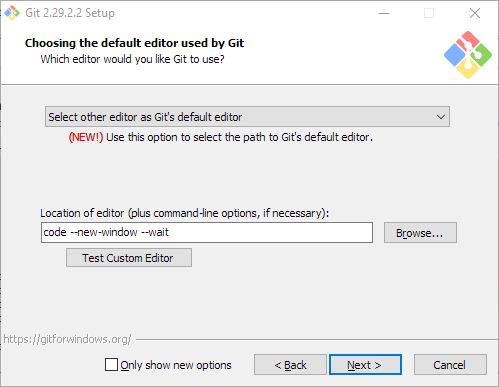
<p>The default editor can be configured in the installation wizard in Windows. Uncheck ‘Only show new options’ to ensure that this step is shown.</p>

<figure class="figure text-center">
  <img src="/images/set-default-git-editor-when-installing-on-windows.png" class="figure-img img-fluid" alt="Set default git editor when installing on Windows" loading="lazy" />
  <figcaption class="figure-caption">The default git editor can be set when installing on Windows. Test the custom editor to enable the Next button.</figcaption>
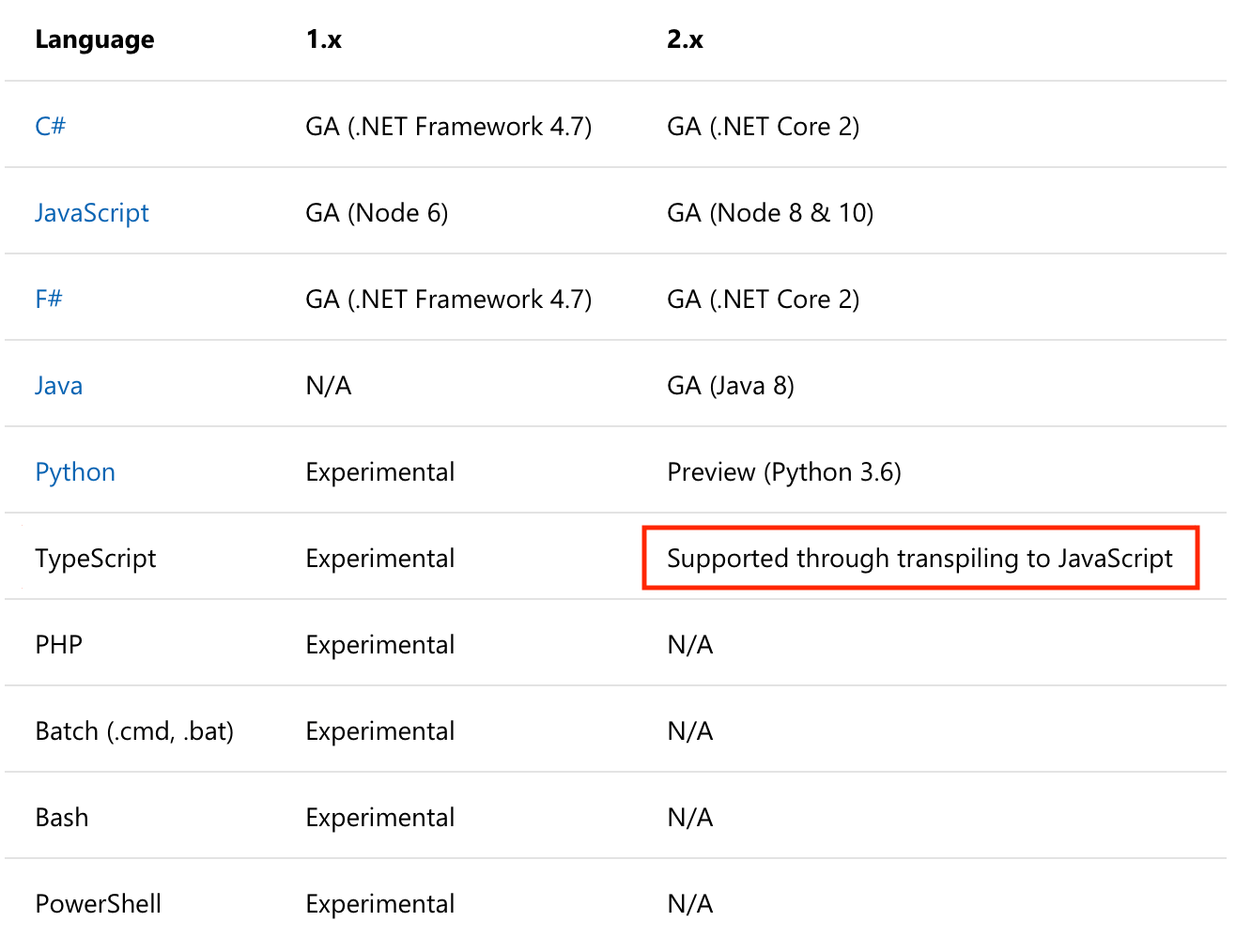
</figure>]]></content><author><name>{&quot;twitter&quot;=&gt;&quot;janaagaard&quot;}</name></author><category term="git" /><category term="VSCode" /><summary type="html"><![CDATA[I use VSCode as my text editor for git, and every time I install git I have to search for this comment on Stack Overflow for the right command to configure this, since it doesn’t open up a new VSCode window by default.]]></summary></entry><entry><title type="html">Azure Functions in TypeScript</title><link href="https://janaagaard.com/blog/2019-06-12-azure-functions-in-typescript" rel="alternate" type="text/html" title="Azure Functions in TypeScript" /><published>2019-06-12T00:00:00+00:00</published><updated>2019-06-12T00:00:00+00:00</updated><id>https://janaagaard.com/blog/azure-functions-in-typescript</id><content type="html" xml:base="https://janaagaard.com/blog/2019-06-12-azure-functions-in-typescript"><![CDATA[<p>Azure Functions are Microsoft’s take on serverless computing—they correspond to Amazon’s AWS Lambda and Google’s Cloud Functions. Microsoft support a range of languages, but in version 2 TypeScript is only <a href="https://docs.microsoft.com/en-us/azure/azure-functions/functions-versions#languages">“supported through transpiling to JavaScript”</a>, and they don’t provide any information about how to set up this up. I’m a big fan of TypeScript, so I have documented one way to this here in the article series.</p>

<p>The source code related to the series is <a href="https://github.com/janaagaard75/azure-functions-typescript">available on GitHub</a>. If you prefer reading code, you can browse the <a href="https://github.com/janaagaard75/azure-functions-typescript/commits/master">commit history</a> instead.</p>

<figure class="figure text-center">
  <img src="/images/typescript-support.png" class="figure-img img-fluid" alt="TypeScript support through transpiling" loading="lazy" />
  <figcaption class="figure-caption">This is pretty much the only thing mentioned about TypeScript for version 2 of Azure Functions. <a href="https://docs.microsoft.com/en-us/azure/azure-functions/functions-versions#languages">Source</a></figcaption>
</figure>

<h2 id="six-parts">Six Parts</h2>

<p>Creating the Azure Function in TypeScript has been split into seven parts. If you already know about Azure Functions in JavaScript you might want to skip ahead to part 2. The tests are very simple, so part 3, 4 and 5 are mostly about configuring CircleCI and creating an ARM template. The 6th part, refactoring,was the most exciting one to write.</p>

<ul>
  <li>
    <p><a href="/blog/2019-06-12-part-1-javascript-version">Part 1: JavaScript version</a>. Install the prerequisites and create a serverless function in JavaScript triggered by HTTP.</p>
  </li>
  <li>
    <p><a href="/blog/2019-06-12-part-2-switch-to-typescript">Part 2: Switch to TypeScript</a>. Convert the JavaScript function to TypeScript.</p>
  </li>
  <li>
    <p><a href="/blog/2019-06-12-part-3-local-test">Part 3: Add a Test</a>. Add a local test and create a continuous integration pipeline that runs the test.</p>
  </li>
  <li>
    <p><a href="/blog/2019-06-12-part-4-continuous-deployment">Part 4: Continuous Deployment</a>. Extend the continuous integration pipeline into a continuous deployment pipeline, finally deploying the code to Azure.</p>
  </li>
  <li>
    <p><a href="/blog/2019-06-12-part-5-end-to-end-test">Part 5: Add an End-to-end Test</a>. Use the public endpoint on Azure to create an end-to-end test.</p>
  </li>
  <li>
    <p><a href="/blog/2019-06-12-part-6-refactor">Part 6: Refactor</a>. Now that we have test coverage we can refactor the code with ease of mind.</p>
  </li>
  <li>
    <p><a href="/blog/2019-06-12-part-7-node-module">Part 7: Node Module</a>. Demonstrate how to use a Node Module.</p>
  </li>
</ul>

<hr class="mt-5" />

<div class="d-flex flex-wrap justify-content-between">
  <div class="mr-4">
    
  </div>
  <div class="ml-auto">
    
      <a href="/blog/2019-06-12-part-1-javascript-version">Part 1: JavaScript version</a>
    
  </div>
</div>]]></content><author><name>{&quot;twitter&quot;=&gt;&quot;janaagaard&quot;}</name></author><category term="ARM templates" /><category term="Azure Functions" /><category term="Azure" /><category term="CircleCI" /><category term="continuous integration" /><category term="continuous deployment" /><category term="infrastructure as code" /><category term="serverless" /><category term="TypeScript" /><summary type="html"><![CDATA[How to write an Azure Function in Typescript with continuous deployment using Circle CI and tests written with Jest.]]></summary></entry><entry><title type="html">Part 1: JavaScript Version</title><link href="https://janaagaard.com/blog/2019-06-12-part-1-javascript-version" rel="alternate" type="text/html" title="Part 1: JavaScript Version" /><published>2019-06-12T00:00:00+00:00</published><updated>2019-06-12T00:00:00+00:00</updated><id>https://janaagaard.com/blog/part-1-javascript-version</id><content type="html" xml:base="https://janaagaard.com/blog/2019-06-12-part-1-javascript-version"><![CDATA[<p>We start out creating a basic HTTP endpoint written as an Azure Function in JavaScript. If you already know about Azure Functions, then skip ahead to <a href="/blog/2019-06-12-part-2-switch-to-typescript">part 2</a> where the code is transformed into TypeScript.</p>

<h2 id="install-prerequisites">Install Prerequisites</h2>

<p><a href="https://docs.microsoft.com/en-us/azure/azure-functions/functions-reference-node#node-version">Azure Functions require a long term support (LTS) version of <strong>Node.js</strong></a>. The latest version, version 12, is an LTS version, but it’s still quite new, so for now to be safe I recommend sticking version 10, since that’s the one that Microsoft mentions in the previous link. When installing older versions with <a href="https://brew.sh/">Homebrew</a> we have to forcibly tell it to set that version to the default one. Remember to re-link if you upgrade Node.js. You can use <a href="https://github.com/nvm-sh/nvm">nvm</a> if you need to switch between different versions of Node.js.</p>

<div class="language-bash highlighter-rouge"><div class="highlight"><pre class="highlight"><code><span class="nv">$ </span>brew <span class="nb">install </span>node@10
<span class="nv">$ </span>brew <span class="nb">link </span>node@10 <span class="nt">--force</span> <span class="nt">--overwrite</span>
</code></pre></div></div>

<p>Install <strong>Yarn</strong>. Yarn is a better npm. I am particularly fund of the really fast installs on a project where the dependencies are up to date, because this allows you include <code class="language-plaintext highlighter-rouge">yarn install</code> as part of the build, making sure that you are always using the correct versions.</p>

<div class="language-bash highlighter-rouge"><div class="highlight"><pre class="highlight"><code><span class="nv">$ </span>brew <span class="nb">install </span>yarn
</code></pre></div></div>

<p>Install the command line tools for Azure Functions, <strong>Azure Functions Core Tools</strong>. This is the <code class="language-plaintext highlighter-rouge">func</code> shell command. The tools are installed as a local Node.js package instead of a global tool because we will be using the <code class="language-plaintext highlighter-rouge">func</code> command later on in our continuous integration pipeline. Installing it locally also has the benefit that if you’re a team of developers, it easy to keep everybody on the same version.</p>

<p>I always install exact versions of the Node.js packages that I use (<code class="language-plaintext highlighter-rouge">--exact</code>) because I like being able to see the versions of the installed packages in <code class="language-plaintext highlighter-rouge">package.json</code>. With the command line tool <a href="https://www.npmjs.com/package/npm-check-updates"><code class="language-plaintext highlighter-rouge">npm-check-updates</code></a> installed you can upgrade all the packages with the command <code class="language-plaintext highlighter-rouge">ncu -u &amp;&amp; yarn upgrade</code>. I recommend keeping upgrades in their own commits to make it easy to revert an upgrade, should it break something.</p>

<div class="language-bash highlighter-rouge"><div class="highlight"><pre class="highlight"><code><span class="nv">$ </span><span class="nb">mkdir </span>azure-functions-typescript
<span class="nv">$ </span><span class="nb">cd </span>azure-functions-typescript
<span class="nv">$ </span>yarn add <span class="nt">--exact</span> <span class="nt">--dev</span> azure-functions-core-tools
</code></pre></div></div>

<p>Initialize the project and create an HTTP triggered function called greet.</p>

<div class="language-bash highlighter-rouge"><div class="highlight"><pre class="highlight"><code><span class="nv">$ </span>yarn run func init <span class="nt">--worker-runtime</span> node
<span class="nv">$ </span>yarn run func new <span class="nt">--name</span> greet <span class="nt">--language</span> JavaScript
<span class="c"># Press 8 to create an HTTP triggered function.</span>
</code></pre></div></div>

<p>This results in the following folder structure. A few notes</p>

<ul>
  <li>Each function must reside in it’s own folder, one level below <code class="language-plaintext highlighter-rouge">host.json</code>.</li>
  <li>Each function must have a <code class="language-plaintext highlighter-rouge">function.json</code> file.</li>
  <li><code class="language-plaintext highlighter-rouge">local.settings.json</code> are only used when hosting the functions locally. They are not copied to Azure when publishing.</li>
</ul>

<div class="language-text highlighter-rouge"><div class="highlight"><pre class="highlight"><code>├── greet
│   ├── function.json
│   ├── index.js
│   └── sample.dat
├── node_modules
│   └── ...
├── host.json
├── local.settings.json
├── package.json
└── yarn.lock
</code></pre></div></div>

<h2 id="hosting-locally">Hosting Locally</h2>

<p>The local Azure Functions host is started with the command <code class="language-plaintext highlighter-rouge">yarn func host start</code>. The <code class="language-plaintext highlighter-rouge">yarn</code> prefix is necessary since the <code class="language-plaintext highlighter-rouge">func</code> command is installed locally. This is bit long to type, so we <a href="https://github.com/janaagaard75/azure-functions-typescript/commit/10ad0215992cd18513d421dd8bf4b1629b68af5f">add a <code class="language-plaintext highlighter-rouge">start</code> script command to <code class="language-plaintext highlighter-rouge">package.json</code></a>. We can now start the local host with this command:</p>

<div class="language-bash highlighter-rouge"><div class="highlight"><pre class="highlight"><code><span class="nv">$ </span>yarn start
</code></pre></div></div>

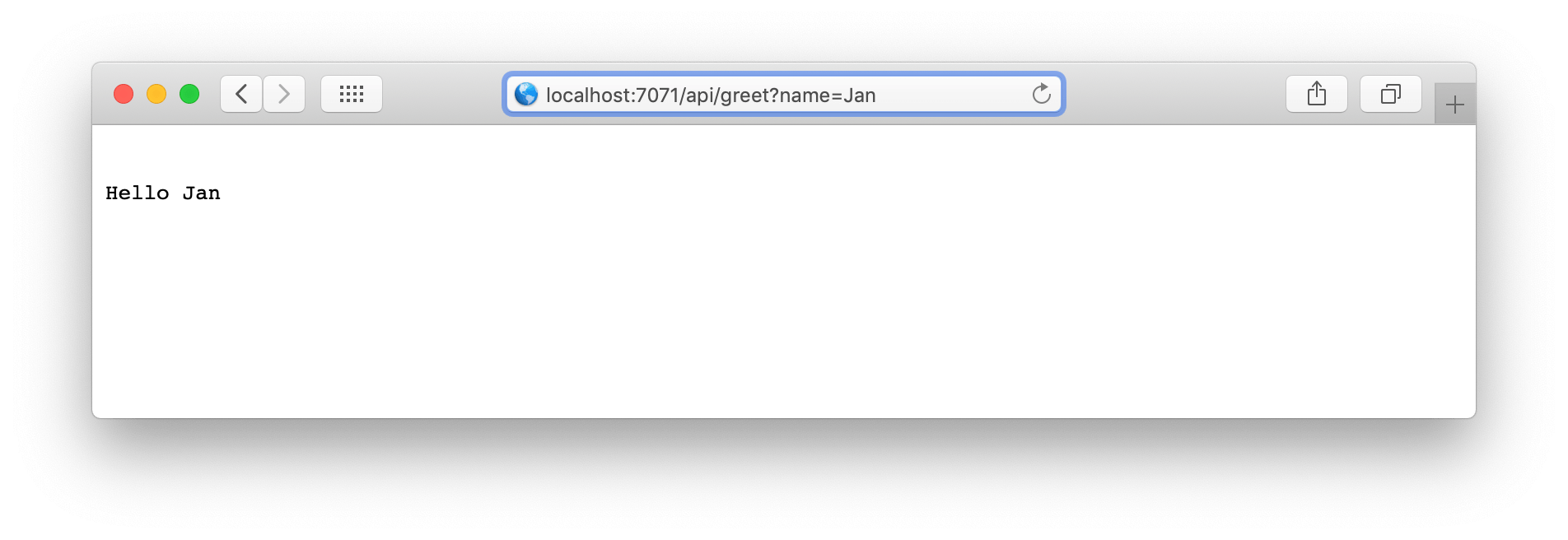
<p>Open a browser window, go to <code class="language-plaintext highlighter-rouge">http://localhost:4000/api/greet</code>, add a name as a query parameter, and you will see it echoed back.</p>

<figure class="figure text-center">
  <img src="/images/running-on-localhost.png" class="figure-img img-fluid" alt="Browser window with output from the greet endpoint" loading="lazy" />
  <figcaption class="figure-caption">The serverless HTTP triggered Azure Function in action. \o/</figcaption>
</figure>

<h2 id="show-me-the-code">Show Me The Code</h2>

<p>The <a href="https://github.com/janaagaard75/azure-functions-typescript/tree/part-1-javascript-version">full code base after part 1</a> has a few more files added to it. They consist of the three things below. If you want more details, then take a look at the <a href="https://github.com/janaagaard75/azure-functions-typescript/commits/part-1-javascript-version">commit history</a>.</p>

<ul>
  <li>Standard files, like a readme, a license and a gitignore file.</li>
  <li>The endpoint is made available anonymously. This is just to make the setup a bit simpler.</li>
  <li>Files for improving the development experience in <a href="https://code.visualstudio.com/">Visual Studio Code</a>.</li>
</ul>

<p>The <a href="https://marketplace.visualstudio.com/items?itemName=ms-azuretools.vscode-azurefunctions">Azure Functions extension for VSCode</a> requires that the Azure Functions Core Tools are available as a global command. I recommend installing the tools with Homebrew, since that makes it easy to maintain the package together with Node.js and Yarn (<code class="language-plaintext highlighter-rouge">brew install azure-functions-core-tools</code>). It’s fine having the tools installed both locally and globally.</p>

<h2 id="debugging">Debugging</h2>

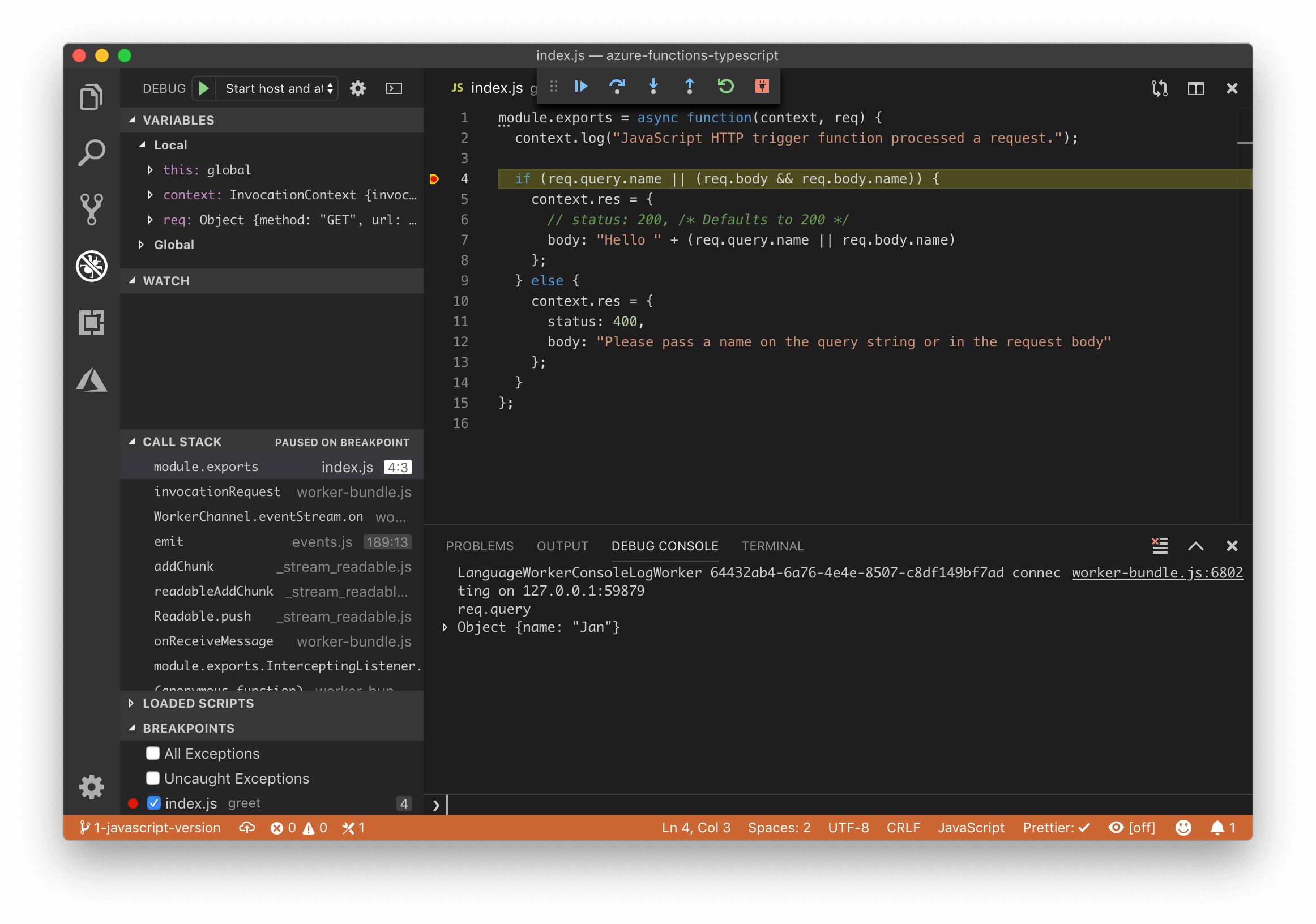
<p>It’s possible to debug and hit breakpoints in Visual Studio Code. Set a breakpoint and start the local host with VSCode’s debugger panel. This will run <code class="language-plaintext highlighter-rouge">yarn start</code> and attach a debugger to Node.js. Remember to trigger the function by calling the <code class="language-plaintext highlighter-rouge">http://localhost:4000/api/greet</code> URL.</p>

<figure class="figure text-center">
  <img src="/images/hitting-a-breakpoint.png" class="figure-img img-fluid" alt="Hit a breakpoint in Visual Studio Code" loading="lazy" />
  <figcaption class="figure-caption">Hitting a breakpoint while debugging in Visual Studio Code.</figcaption>
</figure>

<hr class="mt-5" />

<div class="d-flex flex-wrap justify-content-between">
  <div class="mr-4">
    
      <a href="/blog/2019-06-12-azure-functions-in-typescript">Introduction</a>
    
  </div>
  <div class="ml-auto">
    
      <a href="/blog/2019-06-12-part-2-switch-to-typescript">Part 2: Switch to TypeScript</a>
    
  </div>
</div>]]></content><author><name>{&quot;twitter&quot;=&gt;&quot;janaagaard&quot;}</name></author><category term="Azure Functions" /><category term="Azure" /><category term="serverless" /><summary type="html"><![CDATA[We start out creating a basic HTTP endpoint written as an Azure Function in JavaScript. If you already know about Azure Functions, then skip ahead to part 2 where the code is transformed into TypeScript.]]></summary></entry><entry><title type="html">Part 2: Switch to TypeScript</title><link href="https://janaagaard.com/blog/2019-06-12-part-2-switch-to-typescript" rel="alternate" type="text/html" title="Part 2: Switch to TypeScript" /><published>2019-06-12T00:00:00+00:00</published><updated>2019-06-12T00:00:00+00:00</updated><id>https://janaagaard.com/blog/part-2-switch-to-typescript</id><content type="html" xml:base="https://janaagaard.com/blog/2019-06-12-part-2-switch-to-typescript"><![CDATA[<p>In this second part of the series about writing an Azure Function in TypeScript, the JavaScript function is converted to TypeScript. This is mainly setting up the TypeScript compiler. We won’t make any changes until <a href="/blog/2019-06-12-part-6-refactor">part 6: Refactoring</a>, after the tests have been created.</p>

<p>If you prefer reading code, this is the <a href="https://github.com/janaagaard75/azure-functions-typescript/tree/part-2-switch-to-typescript">code base after part 2</a>.</p>

<h2 id="compiling-the-typescript">Compiling the TypeScript</h2>

<p>To keep things organized we put the source files in a folder named <code class="language-plaintext highlighter-rouge">src</code> and we will be building into a distribution folder named <code class="language-plaintext highlighter-rouge">dist</code>.</p>

<div class="language-text highlighter-rouge"><div class="highlight"><pre class="highlight"><code>├── node_modules
│   └── ...
├── src
│   ├── greet
│   │   ├── function.json
│   │   ├── index.ts (renamed from .js)
│   │   └── sample.dat
│   ├── host.json
│   └── local.settings.json
├── package.json
└── yarn.lock
</code></pre></div></div>

<p>We’re now ready to compile. This will require installing the TypeScript compiler.</p>

<div class="language-bash highlighter-rouge"><div class="highlight"><pre class="highlight"><code><span class="nv">$ </span>yarn add <span class="nt">--exact</span> <span class="nt">--dev</span> typescript
</code></pre></div></div>

<p>The TypeScript compiler is configured with a <code class="language-plaintext highlighter-rouge">tsconfig.json</code> file.</p>

<ul>
  <li><code class="language-plaintext highlighter-rouge">module</code> and <code class="language-plaintext highlighter-rouge">moduleResolution</code> is configured to compile into JavaScript output that is compatible with the Azure Functions host.</li>
  <li><code class="language-plaintext highlighter-rouge">outDir</code> and <code class="language-plaintext highlighter-rouge">rootDir</code> are the output and input folders.</li>
  <li><code class="language-plaintext highlighter-rouge">sourceMap</code> means that we want TypeScript to generate map files along with the js files. This allows us to debug the TypeScript source files, instead of debugging the generated JavaScript files.</li>
  <li><code class="language-plaintext highlighter-rouge">target</code> instructs the compiler to output JavaScript that is compatible with the very recent ECMAScript version 2018. This is possible since <a href="https://node.green/#ES2018">Node.js version 10 supports ECMAScript 2018</a>.</li>
</ul>

<div class="language-javascript highlighter-rouge"><div class="highlight"><pre class="highlight"><code><span class="c1">// tsconfig.json</span>
<span class="p">{</span>
  <span class="dl">"</span><span class="s2">compilerOptions</span><span class="dl">"</span><span class="p">:</span> <span class="p">{</span>
    <span class="dl">"</span><span class="s2">module</span><span class="dl">"</span><span class="p">:</span> <span class="dl">"</span><span class="s2">commonjs</span><span class="dl">"</span><span class="p">,</span>
    <span class="dl">"</span><span class="s2">moduleResolution</span><span class="dl">"</span><span class="p">:</span> <span class="dl">"</span><span class="s2">node</span><span class="dl">"</span><span class="p">,</span>
    <span class="dl">"</span><span class="s2">outDir</span><span class="dl">"</span><span class="p">:</span> <span class="dl">"</span><span class="s2">dist</span><span class="dl">"</span><span class="p">,</span>
    <span class="dl">"</span><span class="s2">rootDir</span><span class="dl">"</span><span class="p">:</span> <span class="dl">"</span><span class="s2">src</span><span class="dl">"</span><span class="p">,</span>
    <span class="dl">"</span><span class="s2">sourceMap</span><span class="dl">"</span><span class="p">:</span> <span class="kc">true</span><span class="p">,</span>
    <span class="dl">"</span><span class="s2">target</span><span class="dl">"</span><span class="p">:</span> <span class="dl">"</span><span class="s2">es2018</span><span class="dl">"</span>
  <span class="p">}</span>
<span class="p">}</span>
</code></pre></div></div>

<p>Note that you strive to always turn on TypeScript strict mode that enables a handful of very nice compile time checks. We will do this when refactoring the code in <a href="2019-06-12-part-6-refactor">part 6</a>.</p>

<p>Building the solution consists of two things:</p>

<ol>
  <li>Compiling the TypeScript files and</li>
  <li>copying the json files from <code class="language-plaintext highlighter-rouge">src</code> to <code class="language-plaintext highlighter-rouge">dist</code>.</li>
</ol>

<p>We create a <code class="language-plaintext highlighter-rouge">build</code> command to handle this, and we update our <code class="language-plaintext highlighter-rouge">start</code> command so that the solution is built before starting the host. The start is also updated to switch to the <code class="language-plaintext highlighter-rouge">dist</code> folder.</p>

<div class="language-javascript highlighter-rouge"><div class="highlight"><pre class="highlight"><code><span class="c1">// In package.json</span>
<span class="dl">"</span><span class="s2">scripts</span><span class="dl">"</span><span class="p">:</span> <span class="p">{</span>
  <span class="dl">"</span><span class="s2">build</span><span class="dl">"</span><span class="p">:</span> <span class="dl">"</span><span class="s2">tsc &amp;&amp; cp src/*.json dist &amp;&amp; cp src/greet/*.json dist/greet</span><span class="dl">"</span><span class="p">,</span>
  <span class="dl">"</span><span class="s2">start</span><span class="dl">"</span><span class="p">:</span> <span class="dl">"</span><span class="s2">yarn run build &amp;&amp; (cd dist; func host start)</span><span class="dl">"</span>
<span class="p">}</span>
</code></pre></div></div>

<p>We still use <code class="language-plaintext highlighter-rouge">yarn run start</code> to start our local Azure host, but now the code is compiled first.</p>

<h2 id="copying-files">Copying Files</h2>

<p>The command for copying the json files <code class="language-plaintext highlighter-rouge">cp src/*.json dist &amp;&amp; cp src/greet/*.json dist/greet</code> would have to be updated every time we add or rename a function. This is avoided by using the small <a href="https://github.com/calvinmetcalf/copyfiles">copyfiles</a> command line tool.</p>

<div class="language-javascript highlighter-rouge"><div class="highlight"><pre class="highlight"><code><span class="c1">// In package.json</span>
<span class="dl">"</span><span class="s2">build</span><span class="dl">"</span><span class="p">:</span> <span class="dl">"</span><span class="s2">tsc &amp;&amp; copyfiles --up 1 </span><span class="se">\"</span><span class="s2">src/**/*.json</span><span class="se">\"</span><span class="s2"> dist</span><span class="dl">"</span><span class="p">,</span>
</code></pre></div></div>

<p>Right now the build command is very simple, but as the project grows it might become beneficial to introduce a build tool like Webpack. We explore using Webpack in <a href="2019-06-12-part-7-node-module">part 7</a>.</p>

<hr class="mt-5" />

<div class="d-flex flex-wrap justify-content-between">
  <div class="mr-4">
    
      <a href="/blog/2019-06-12-part-1-javascript-version">Part 1: JavaScript version</a>
    
  </div>
  <div class="ml-auto">
    
      <a href="/blog/2019-06-12-part-3-local-test">Part 3: Local Test</a>
    
  </div>
</div>]]></content><author><name>{&quot;twitter&quot;=&gt;&quot;janaagaard&quot;}</name></author><category term="Azure Functions" /><category term="Azure" /><category term="serverless" /><category term="TypeScript" /><summary type="html"><![CDATA[In this second part of the series about writing an Azure Function in TypeScript, the JavaScript function is converted to TypeScript. This is mainly setting up the TypeScript compiler. We won’t make any changes until part 6: Refactoring, after the tests have been created.]]></summary></entry><entry><title type="html">Part 3: Local Test</title><link href="https://janaagaard.com/blog/2019-06-12-part-3-local-test" rel="alternate" type="text/html" title="Part 3: Local Test" /><published>2019-06-12T00:00:00+00:00</published><updated>2019-06-12T00:00:00+00:00</updated><id>https://janaagaard.com/blog/part-3-local-test</id><content type="html" xml:base="https://janaagaard.com/blog/2019-06-12-part-3-local-test"><![CDATA[<p>This is the third part of a series about creating Azure Functions in TypeScript. In this part we add a test using the <a href="https://jestjs.io/">Jest</a> test framework and then use the <a href="https://circleci.com/">CircleCI</a> continuous integration framework to run the test automatically each time code is pushed to GitHub.</p>

<p>The <a href="https://github.com/janaagaard75/azure-functions-typescript/tree/part-3-local-test">code after this third part</a>.</p>

<h2 id="writing-the-test">Writing the Test</h2>

<p>Since we’re coding in TypeScript we also have to install <code class="language-plaintext highlighter-rouge">ts-jest</code> and <code class="language-plaintext highlighter-rouge">@types/jest</code> when installing <code class="language-plaintext highlighter-rouge">jest</code>.</p>

<div class="language-bash highlighter-rouge"><div class="highlight"><pre class="highlight"><code><span class="nv">$ </span>yarn add <span class="nt">--exact</span> <span class="nt">--dev</span> jest ts-jest @types/jest
</code></pre></div></div>

<p>(Side note: Installing Jest blows up the number of Node packages from 108 to 448. These guys really like using packages.)</p>

<p>Our test is pretty straight forward: It creates fake <code class="language-plaintext highlighter-rouge">request</code> and <code class="language-plaintext highlighter-rouge">context</code> objects and calls the <code class="language-plaintext highlighter-rouge">run</code> function to verify that the response is indeed <code class="language-plaintext highlighter-rouge">Hello Jan Aagaard</code> as expected.</p>

<div class="language-typescript highlighter-rouge"><div class="highlight"><pre class="highlight"><code><span class="c1">// greet/index.test.ts</span>
<span class="k">import</span> <span class="p">{</span> <span class="nx">run</span> <span class="k">as</span> <span class="nx">greet</span> <span class="p">}</span> <span class="k">from</span> <span class="dl">"</span><span class="s2">./index</span><span class="dl">"</span><span class="p">;</span>

<span class="nx">describe</span><span class="p">(</span><span class="dl">"</span><span class="s2">greet function</span><span class="dl">"</span><span class="p">,</span> <span class="p">()</span> <span class="o">=&gt;</span> <span class="p">{</span>
  <span class="nx">test</span><span class="p">(</span><span class="dl">"</span><span class="s2">returns correct greeting</span><span class="dl">"</span><span class="p">,</span> <span class="k">async</span> <span class="p">()</span> <span class="o">=&gt;</span> <span class="p">{</span>
    <span class="kd">const</span> <span class="nx">request</span> <span class="o">=</span> <span class="p">{</span>
      <span class="na">query</span><span class="p">:</span> <span class="p">{</span>
        <span class="na">name</span><span class="p">:</span> <span class="dl">"</span><span class="s2">Jan Aagaard</span><span class="dl">"</span>
      <span class="p">}</span>
    <span class="p">};</span>

    <span class="kd">const</span> <span class="nx">context</span> <span class="o">=</span> <span class="p">{</span>
      <span class="na">log</span><span class="p">:</span> <span class="p">()</span> <span class="o">=&gt;</span> <span class="kc">undefined</span><span class="p">,</span>
      <span class="na">req</span><span class="p">:</span> <span class="nx">request</span>
    <span class="p">};</span>

    <span class="k">await</span> <span class="nx">greet</span><span class="p">(</span><span class="nx">context</span><span class="p">,</span> <span class="nx">request</span><span class="p">);</span>
    <span class="kd">const</span> <span class="nx">response</span> <span class="o">=</span> <span class="p">(</span><span class="nx">context</span> <span class="k">as</span> <span class="kr">any</span><span class="p">).</span><span class="nx">res</span><span class="p">;</span>

    <span class="nx">expect</span><span class="p">(</span><span class="nx">response</span><span class="p">.</span><span class="nx">body</span><span class="p">).</span><span class="nx">toBe</span><span class="p">(</span><span class="dl">"</span><span class="s2">Hello Jan Aagaard</span><span class="dl">"</span><span class="p">);</span>
  <span class="p">});</span>
<span class="p">});</span>
</code></pre></div></div>

<h2 id="running-the-tests-in-visual-studio-code">Running the Tests in Visual Studio Code</h2>

<p>The code base includes a script command to run the tests, so that they can be executed by typing <code class="language-plaintext highlighter-rouge">yarn test</code>. Instead of relying on an external command to run the tests, I recommend installing the excellent <a href="https://marketplace.visualstudio.com/itemdetails?itemName=Orta.vscode-jest">Jest extension for Visual Studio Code</a>. I will run the tests continuously in the background, and show the results in VSCode’s status bar.</p>

<p>The default setting is to show a ‘Debug’ link above the tests that are failing, but I like being able to step into my code at any time. Adding the following line to <code class="language-plaintext highlighter-rouge">.vscode/settings.json</code> makes the ‘Debug’ link show permanently.</p>

<div class="language-javascript highlighter-rouge"><div class="highlight"><pre class="highlight"><code><span class="c1">// In .vscode/settings.json</span>
<span class="dl">"</span><span class="s2">jest.debugCodeLens.showWhenTestStateIn</span><span class="dl">"</span><span class="p">:</span> <span class="p">[</span><span class="dl">"</span><span class="s2">fail</span><span class="dl">"</span><span class="p">,</span> <span class="dl">"</span><span class="s2">pass</span><span class="dl">"</span><span class="p">,</span> <span class="dl">"</span><span class="s2">skip</span><span class="dl">"</span><span class="p">,</span> <span class="dl">"</span><span class="s2">unknown</span><span class="dl">"</span><span class="p">],</span>
</code></pre></div></div>

<h2 id="running-the-tests-when-pushing-commits">Running the Tests When Pushing Commits</h2>

<p>Instead of relying on that the developers remember to run the tests locally, we will set up a continuous integration pipeline that executes the tests and blocks the pull request, should any of them fail. <a href="https://circleci.com/">CircleCI</a> is one of the options for automating builds when having code hosted on GitHub, and it seems like it’s currently gaining a lot of traction. Create your CircleCI account by signing in via GitHub, and then create a <code class="language-plaintext highlighter-rouge">config.yml</code> file that configures pipeline. These are the steps in the pipeline:</p>

<ol>
  <li>Check out the code from GitHub.</li>
  <li>Install the Node.js packages.</li>
  <li>Build the code.</li>
  <li>Lint the code.</li>
  <li>Run the tests.</li>
</ol>

<p>It isn’t necessary to build the code before running the tests because <code class="language-plaintext highlighter-rouge">ts-jest</code> takes care of that when running them. But it’s nice to include the build step anyways to catch any compile errors, and likewise we also include a lint step.</p>

<div class="language-yaml highlighter-rouge"><div class="highlight"><pre class="highlight"><code><span class="c1"># .circleci/config.yml</span>
<span class="na">version</span><span class="pi">:</span> <span class="m">2.1</span>
<span class="na">jobs</span><span class="pi">:</span>
  <span class="na">build</span><span class="pi">:</span>
    <span class="na">docker</span><span class="pi">:</span>
      <span class="c1"># Match the version in azure-resource.json. See https://docs.microsoft.com/en-us/azure/azure-functions/functions-reference-node#node-version.</span>
      <span class="pi">-</span> <span class="na">image</span><span class="pi">:</span> <span class="s">circleci/node:10.14.1-stretch</span>

    <span class="na">steps</span><span class="pi">:</span>
      <span class="pi">-</span> <span class="s">checkout</span>

      <span class="pi">-</span> <span class="na">run</span><span class="pi">:</span>
          <span class="na">name</span><span class="pi">:</span> <span class="s">Install Node modules</span>
          <span class="na">command</span><span class="pi">:</span> <span class="s">yarn install --frozen-lockfile</span>

      <span class="pi">-</span> <span class="na">run</span><span class="pi">:</span>
          <span class="na">name</span><span class="pi">:</span> <span class="s">Build</span>
          <span class="na">command</span><span class="pi">:</span> <span class="s">yarn run build</span>

      <span class="pi">-</span> <span class="na">run</span><span class="pi">:</span>
          <span class="na">name</span><span class="pi">:</span> <span class="s">Lint</span>
          <span class="na">command</span><span class="pi">:</span> <span class="s">yarn run lint</span>

      <span class="pi">-</span> <span class="na">run</span><span class="pi">:</span>
          <span class="na">name</span><span class="pi">:</span> <span class="s">Run tests</span>
          <span class="na">command</span><span class="pi">:</span> <span class="s">yarn run test</span>
</code></pre></div></div>

<p>The <a href="https://github.com/janaagaard75/azure-functions-typescript/blob/part-3-local-test/.circleci/config.yml">final <code class="language-plaintext highlighter-rouge">config.yml</code></a> has a few more steps, adding a cache of the <code class="language-plaintext highlighter-rouge">node_modules</code> folder to speed up the build time and presenting the test results in CircleCI.</p>

<ol>
  <li>Check out the code from GitHub.</li>
  <li><em>Restore cached <code class="language-plaintext highlighter-rouge">node_modules</code>.</em></li>
  <li>Install the Node.js packages.</li>
  <li><em>Cache <code class="language-plaintext highlighter-rouge">node_modules</code>.</em></li>
  <li>Build the code.</li>
  <li>Lint the code.</li>
  <li>Run the tests.</li>
  <li><em>Store test results in CircleCI.</em></li>
</ol>

<p>CircleCI requires that test results are stored as JUnit XML files, and Jest uses json by default. The command for saving the test results ended up being quite long.</p>

<div class="language-javascript highlighter-rouge"><div class="highlight"><pre class="highlight"><code><span class="c1">// In package.json</span>
<span class="dl">"</span><span class="s2">test-save-results</span><span class="dl">"</span><span class="p">:</span> <span class="dl">"</span><span class="s2">cross-env JEST_JUNIT_OUTPUT=test-results/test-results.xml jest --ci --runInBand --reporters=default --reporters=jest-junit</span><span class="dl">"</span>
</code></pre></div></div>

<hr class="mt-5" />

<div class="d-flex flex-wrap justify-content-between">
  <div class="mr-4">
    
      <a href="/blog/2019-06-12-part-2-switch-to-typescript">Part 2: Switch to TypeScript</a>
    
  </div>
  <div class="ml-auto">
    
      <a href="/blog/2019-06-12-part-4-continuous-deployment">Part 4: Continuous Deployment</a>
    
  </div>
</div>]]></content><author><name>{&quot;twitter&quot;=&gt;&quot;janaagaard&quot;}</name></author><category term="Azure Functions" /><category term="CircleCI" /><category term="Jest" /><category term="continuous integration" /><category term="TypeScript" /><summary type="html"><![CDATA[This is the third part of a series about creating Azure Functions in TypeScript. In this part we add a test using the Jest test framework and then use the CircleCI continuous integration framework to run the test automatically each time code is pushed to GitHub.]]></summary></entry><entry><title type="html">Part 4: Continuous Deployment</title><link href="https://janaagaard.com/blog/2019-06-12-part-4-continuous-deployment" rel="alternate" type="text/html" title="Part 4: Continuous Deployment" /><published>2019-06-12T00:00:00+00:00</published><updated>2019-06-12T00:00:00+00:00</updated><id>https://janaagaard.com/blog/part-4-continuous-deployment</id><content type="html" xml:base="https://janaagaard.com/blog/2019-06-12-part-4-continuous-deployment"><![CDATA[<p>Fourth part in the series about Azure Functions in TypeScript. In this part the continuous integration pipeline is extended into a <em>continuous deployment</em> pipeline, where code pushed to GitHub is it automatically deployed to Azure. Until now the code has only been running locally, and this is somewhat ironic since we are halfway into a series about cloud computing. We will remedy this now.</p>

<p><a href="https://github.com/janaagaard75/azure-functions-typescript/tree/part-4-continuous-deployment">The code after this fourth part</a>.</p>

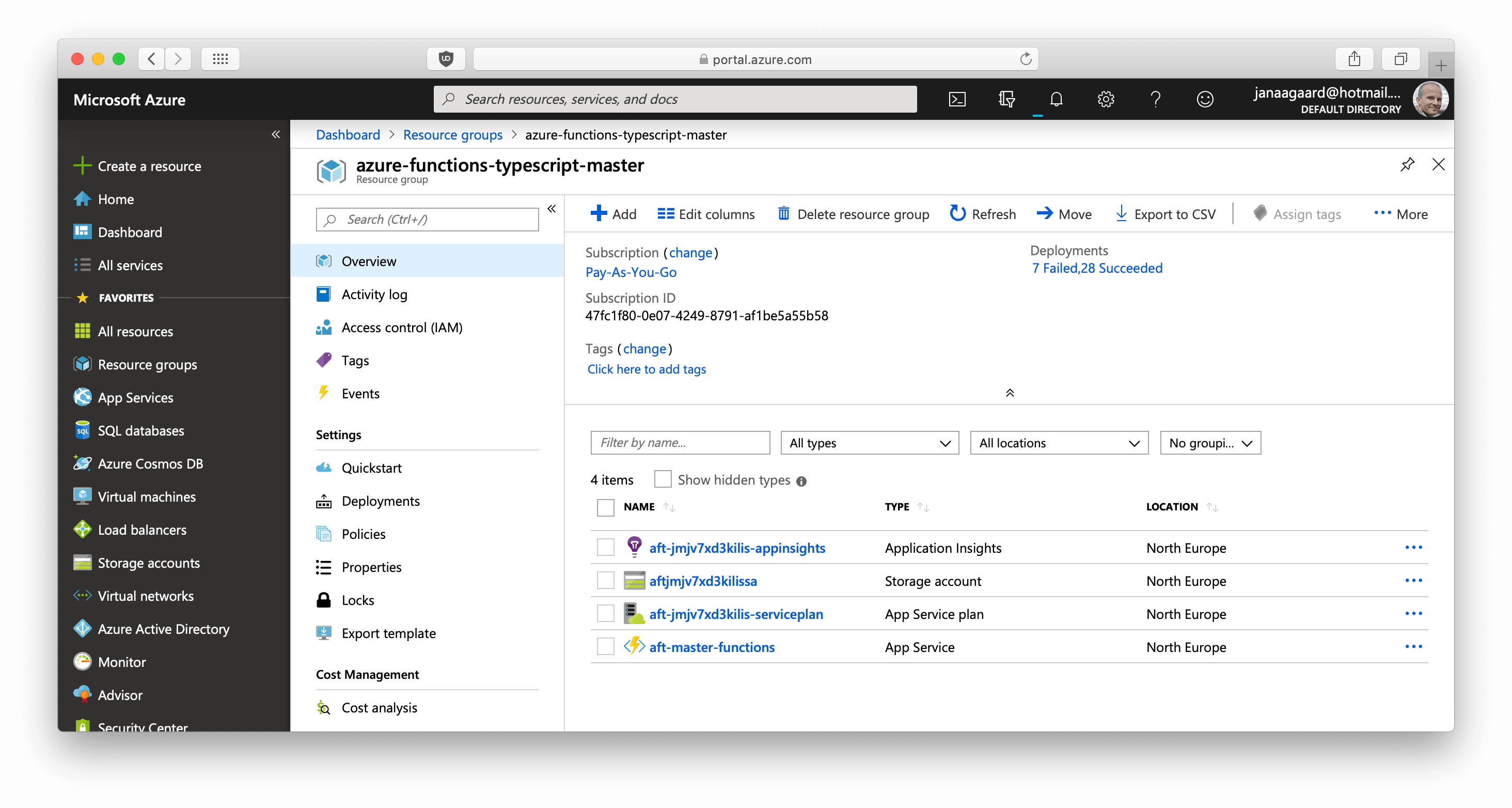
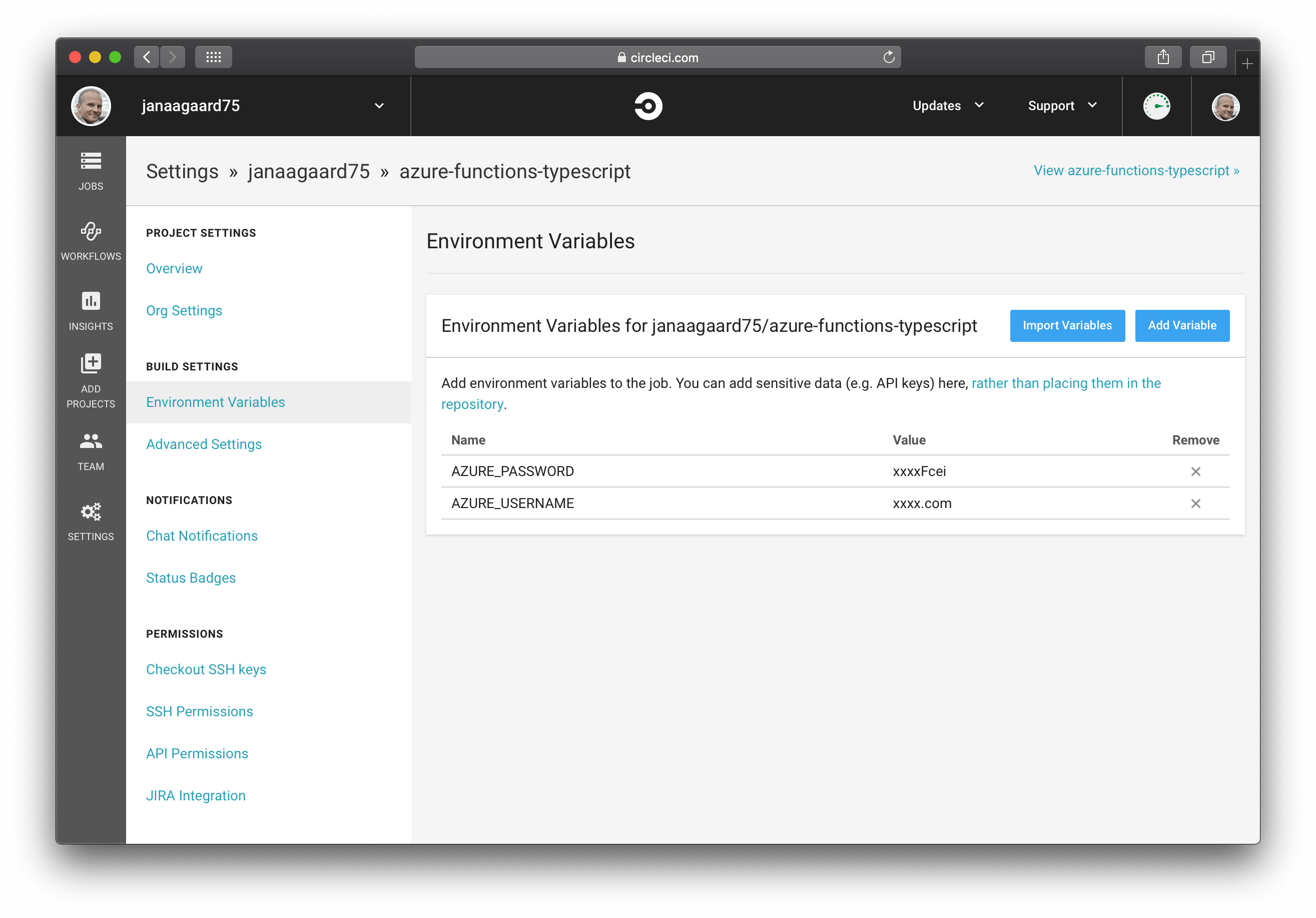
<p>We could log in to the Azure Portal, create the necessary resources, and upload the code manually, but instead we will deploy by scripting the process so that we get <em>infrastructure as code</em> where everything is checked into our source tree.</p>

<p><a href="https://docs.microsoft.com/en-us/azure/azure-resource-manager/">Azure’s Asset Resource Management templates</a> are tricky at first, but once you have used a development setup with automated deployment, I guarantee that you will not want to go back to manual deployments. If you want to know more about all the benefits, the great Martin Fowler has a <a href="https://martinfowler.com/articles/continuousIntegration.html">series about continuous integration</a> where he explains all the benefits.</p>

<p>You need an account on Azure. You can create one for free on <a href="https://portal.azure.com/">portal.azure.com</a>. If you’re new to Azure I recommend that you try some of the manual tutorial out there to get a feel for how the portal works.</p>

<h2 id="branch-environments">Branch Environments</h2>

<p>Each branch in our source code has an associated unique environment on Azure. New environments are automatically spawned when new branches are created. With such a setup there is are no specific development, test or staging environments. Instead, each branch environment takes each of these role corresponding to the state of the task. So while you’re developing the task it’s a dev environment, when the tests run it’s a test environment, and when the task is tested manually it’s a staging environment.</p>

<p>The production environment is simply the one associated with the master branch. Well, almost. In real world applications, the production environment probably has more resources and nicer URLs than the branch environments, and that leads to also having a test environment that mimics the production setup. But in this tutorial we have the luxury of keeping all environments identical, thus simplifying the infrastructure code and fully respecting <a href="https://12factor.net/dev-prod-parity">dev/prod parity</a>.</p>

<p>Example:</p>

<ul>
  <li>Brach name: <code class="language-plaintext highlighter-rouge">master</code>.</li>
  <li>Azure resource group name: <code class="language-plaintext highlighter-rouge">azure-functions-typescript-master</code>.</li>
  <li>Endpoint address for the Greet function: <code class="language-plaintext highlighter-rouge">https://aft-master-functions.azurewebsites.net/api/greet/</code>.</li>
</ul>

<figure class="figure text-center">
  <img src="/images/function-app-resources.png" class="figure-img img-fluid" alt="Azure resources as shown on the Azure Portal" loading="lazy" />
  <figcaption class="figure-caption">Azure resources as shown on the Azure Portal.</figcaption>
</figure>

<h2 id="continuous-deployment-pipeline">Continuous Deployment Pipeline</h2>

<ol>
  <li>The step <code class="language-plaintext highlighter-rouge">Create or update Azure resources</code> in <a href="https://github.com/janaagaard75/azure-functions-typescript/blob/part-4-continuous-deployment/.circleci/config.yml"><code class="language-plaintext highlighter-rouge">config.yml</code></a> calls <code class="language-plaintext highlighter-rouge">create-azure-resources.sh</code> with the branch name as a parameter.</li>
  <li><a href="https://github.com/janaagaard75/azure-functions-typescript/blob/part-4-continuous-deployment/.circleci/create-azure-resources.sh"><code class="language-plaintext highlighter-rouge">create-azure-resources.sh</code></a> uses the <a href="https://docs.microsoft.com/en-us/cli/azure/?view=azure-cli-latest">Azure Command-Line Interface</a> (the <code class="language-plaintext highlighter-rouge">az</code> command) to create a resource group and then the resources inside the group. The resources are described in <a href="ttps://github.com/janaagaard75/azure-functions-typescript/blob/part-4-continuous-deployment/.circleci/create-azure-resources.sh"><code class="language-plaintext highlighter-rouge">azure-resources.json</code></a>.</li>
  <li>The step <code class="language-plaintext highlighter-rouge">Publish code to Azure</code> in <a href="https://github.com/janaagaard75/azure-functions-typescript/blob/part-4-continuous-deployment/.circleci/config.yml"><code class="language-plaintext highlighter-rouge">config.yml</code></a> calls <code class="language-plaintext highlighter-rouge">publish-to-azure.sh</code> with the branch name as a parameter.</li>
  <li><a href="https://github.com/janaagaard75/azure-functions-typescript/blob/part-4-continuous-deployment/.circleci/publish-to-azure.sh"><code class="language-plaintext highlighter-rouge">publish-to-azure.sh</code></a> uses the Azure CLI to copy the compiled JavaScript to Azure.</li>
</ol>

<h2 id="naming-azure-resources">Naming Azure Resources</h2>

<p>As you can tell just from the length of the official <a href="https://docs.microsoft.com/en-us/azure/architecture/best-practices/naming-conventions">Naming conventions for Azure resources</a>, naming resources in Azure is surprising difficult.</p>

<p>Here are the main restrictions:</p>

<ul>
  <li>Resource names have to be globally unique. Yes, that’s across all users of Azure, not just your own/your company’s!</li>
  <li>There are different restrictions depending on the type of the resource.</li>
  <li>Some resources have very restrictive naming rules. Storage accounts names are probably the worst. They can only be 24 characters long and cannot contain any punctuation.</li>
</ul>

<h3 id="hash-in-resource-name">Hash in Resource Name</h3>

<p>We can use <code class="language-plaintext highlighter-rouge">uniqueString()</code> to generates a unique string, making sure that we don’t have a name clash with someone else, and at 13 characters it’s short enough to fit into the storage account name.</p>

<p><code class="language-plaintext highlighter-rouge">"[concat('aft', uniqueString(resourceGroup().id), 'sa')]"</code>
<br />becomes <code class="language-plaintext highlighter-rouge">aftjmjv7xd3kilis-appsa</code>.</p>

<h3 id="branch-name-in-resource-name">Branch name in Resource Name</h3>

<p>The function apps resource uses the branch name as part of the resource:</p>

<p><code class="language-plaintext highlighter-rouge">[concat('aft-', skip(resourceGroup().name, length('azure-functions-typescript-')), '-functions')]</code>
<br />becomes <code class="language-plaintext highlighter-rouge">aft-master-functions</code>.</p>

<p>Using the branch name as part of the function app name puts some restrictions on the branch names:</p>

<ul>
  <li>Only lower cased US letters and hyphens.</li>
  <li>Maximum length of 47 characters.*</li>
  <li>Don’t start or end with a hyphen, and don’t use consecutive hyphens.</li>
</ul>

<p>*) Max_function_app_length - (length(<code class="language-plaintext highlighter-rouge">atf-</code>) + length(<code class="language-plaintext highlighter-rouge">-function</code>))
<br />= 60 - (4 + 9)
<br />= 47.</p>

<p>A test should verify 1) that a branch name adhere to these rules, and 2) that it doesn’t clash with the name of another branch before the resources are published. This has not been done.</p>

<h2 id="installing-azure-cli-in-circleci-and-giving-circleci-access-to-azure">Installing Azure CLI in CircleCI and Giving CircleCI Access to Azure</h2>

<p>It’s quite complicated to install the Azure CLI on CircleCI, but fortunately the <a href="https://circleci.com/orbs/registry/orb/circleci/azure-cli">Azure CLI orb</a> handles that. The orb uses the two parameters <code class="language-plaintext highlighter-rouge">AZURE_PASSWORD</code> and <code class="language-plaintext highlighter-rouge">AZURE_USERNAME</code> when signing in to Azure, so add them as environment variables in CircleCI.</p>

<figure class="figure text-center">
  <img src="/images/circleci-environment-variables.png" class="figure-img img-fluid" alt="Environment variables defined in CircleCI" loading="lazy" />
  <figcaption class="figure-caption">Define AZURE_USERNAME and AZURE_PASSWORD as environment variables in CircleCI.</figcaption>
</figure>

<h2 id="cleaning-up-is-missing">Cleaning Up is Missing</h2>

<p>A complete solution should of course also clean up after itself and delete the branch environments when a branch is delete. CircleCI does unfortunately not support executing a job when a branch is deleted, so a more complicated solution would have to built. Other CI systems like GitLab’s integrated CI/CD supports triggering jobs when branches are deleted, so hopefully CircleCI will add this feature too.</p>

<hr class="mt-5" />

<div class="d-flex flex-wrap justify-content-between">
  <div class="mr-4">
    
      <a href="/blog/2019-06-12-part-3-local-test">Part 3: Local test</a>
    
  </div>
  <div class="ml-auto">
    
      <a href="/blog/2019-06-12-part-5-end-to-end-test">Part 5: End-to-end Test</a>
    
  </div>
</div>]]></content><author><name>{&quot;twitter&quot;=&gt;&quot;janaagaard&quot;}</name></author><category term="ARM templates" /><category term="Azure Functions" /><category term="Azure" /><category term="CircleCI" /><category term="continuous deployment" /><category term="infrastructure as code" /><summary type="html"><![CDATA[Fourth part in the series about Azure Functions in TypeScript. In this part the continuous integration pipeline is extended into a continuous deployment pipeline, where code pushed to GitHub is it automatically deployed to Azure. Until now the code has only been running locally, and this is somewhat ironic since we are halfway into a series about cloud computing. We will remedy this now.]]></summary></entry></feed>